
自定义登录页面
TIP
自定义授权服务器登录页面扩展
效果图
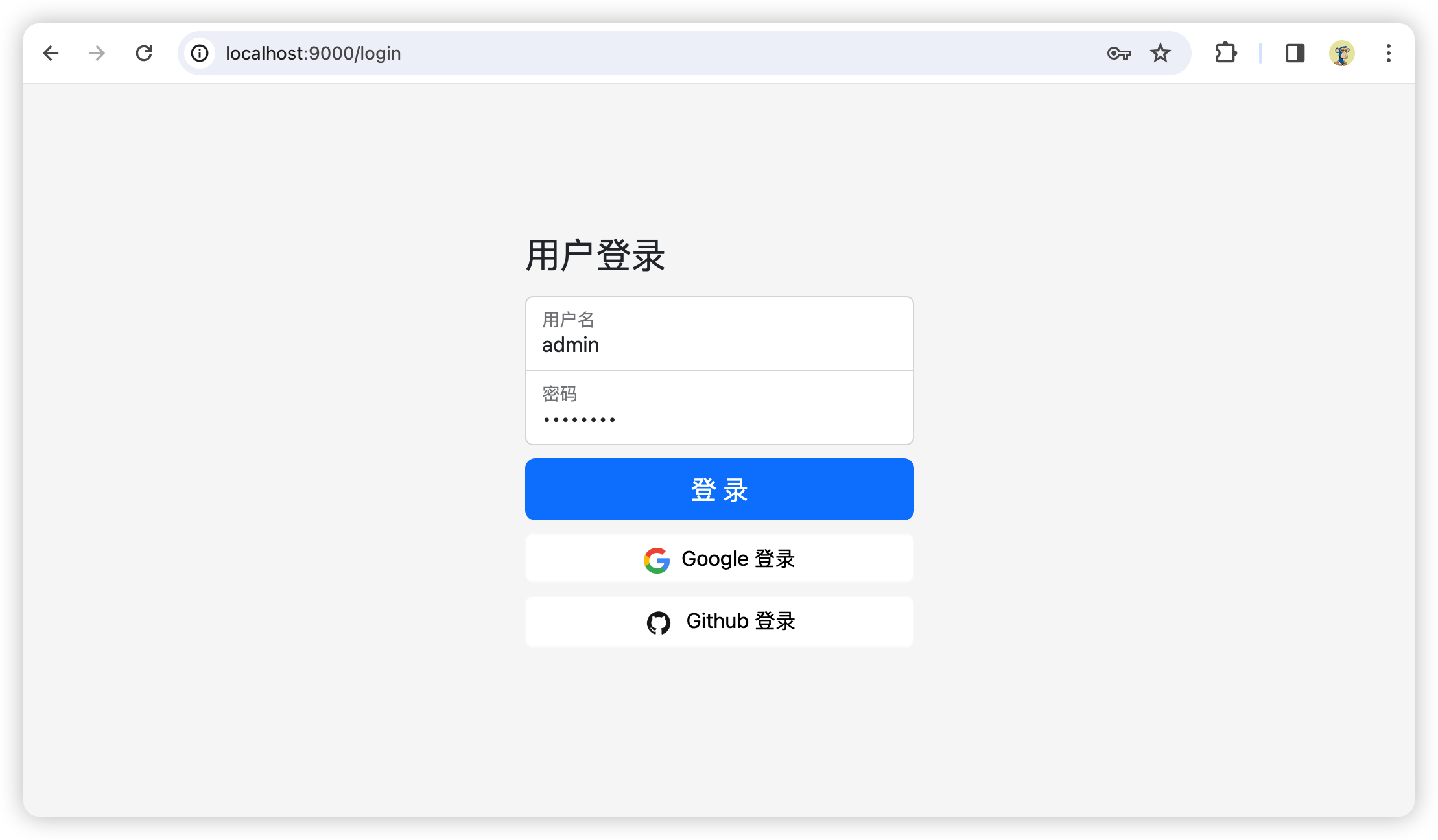
pom.xml
xml
<project xmlns="http://maven.apache.org/POM/4.0.0" xmlns:xsi="http://www.w3.org/2001/XMLSchema-instance"
xsi:schemaLocation="http://maven.apache.org/POM/4.0.0 http://maven.apache.org/xsd/maven-4.0.0.xsd">
<modelVersion>4.0.0</modelVersion>
<parent>
<groupId>com.pigcloud</groupId>
<artifactId>pigx</artifactId>
<version>1.0.0-SNAPSHOT</version>
</parent>
<artifactId>pigx-auth</artifactId>
<packaging>jar</packaging>
<description>PIGX 统一认证授权服务</description>
<name>pigx-auth</name>
<url>http://maven.apache.org</url>
<properties>
<project.build.sourceEncoding>UTF-8</project.build.sourceEncoding>
</properties>
<dependencies>
<!-- 添加Spring Boot的OAuth2授权服务器支持,用于构建OAuth 2.0授权服务器 -->
<dependency>
<groupId>org.springframework.boot</groupId>
<artifactId>spring-boot-starter-oauth2-authorization-server</artifactId>
</dependency>
<!-- 添加Spring Boot的安全支持,包括认证和授权功能 -->
<dependency>
<groupId>org.springframework.boot</groupId>
<artifactId>spring-boot-starter-security</artifactId>
</dependency>
<!-- 添加Spring Boot的Web支持依赖,用于构建基于Spring的Web应用 -->
<dependency>
<groupId>org.springframework.boot</groupId>
<artifactId>spring-boot-starter-web</artifactId>
</dependency>
<!-- 引入Spring Boot的Thymeleaf模板引擎支持,用于构建Web应用的视图 -->
<dependency>
<groupId>org.springframework.boot</groupId>
<artifactId>spring-boot-starter-thymeleaf</artifactId>
</dependency>
login.html
文件目录:src\main\resources\templates\login.html
html
<!--
  ~    Copyright [yyyy] [name of copyright owner]
  ~
  ~    Licensed under the Apache License, Version 2.0 (the "License");
  ~    you may not use this file except in compliance with the License.
  ~    You may obtain a copy of the License at
  ~
  ~        http://www.apache.org/licenses/LICENSE-2.0
  ~
  ~    Unless required by applicable law or agreed to in writing, software
  ~    distributed under the License is distributed on an "AS IS" BASIS,
  ~    WITHOUT WARRANTIES OR CONDITIONS OF ANY KIND, either express or implied.
  ~    See the License for the specific language governing permissions and
  ~    limitations under the License.
  -->

<!DOCTYPE html>
<html lang="zh" xmlns="http://www.w3.org/1999/xhtml" xmlns:th="https://www.thymeleaf.org">
<head>
  <meta charset="utf-8" />
  <!--    <link rel="icon" href="/favicon.ico" type="image/x-icon">-->
  <link rel="icon" href="/favicon.svg" type="image/svg+xml"/>
  <meta name="viewport" content="width=device-width, initial-scale=1">
  <title>用户登录 | PIGX 微服务开发平台</title>
  <link rel="stylesheet" href="/webjars/bootstrap/css/bootstrap.css" th:href="@{/webjars/bootstrap/css/bootstrap.css}" />
  <link rel="stylesheet" href="/assets/css/signin.css" th:href="@{/assets/css/signin.css}" />
</head>
<body>
<div class="container">
  <form class="form-signin w-100 m-auto" method="post" th:action="@{/login}">
    <div th:if="${param.error}" class="alert alert-danger" role="alert">
      用户名或密码无效。
    </div>
    <div th:if="${param.logout}" class="alert alert-success" role="alert">
      您已注销。
    </div>
    <h1 class="h3 mb-3 fw-normal">用户登录</h1>
    <div class="form-floating">
      <input type="text" id="username" name="username" class="form-control" required autofocus>
      <label for="username">用户名</label>
    </div>
    <div class="form-floating">
      <input type="password" id="password" name="password" class="form-control" required>
      <label for="password">密码</label>
    </div>
    <div>
      <button class="w-100 btn btn-lg btn-primary btn-block" type="submit">登 录</button>
      <a class="w-100 btn btn-light btn-block bg-white" href="/oauth2/authorization/google-idp" role="link" style="margin-top: 10px">
        <img src="/assets/img/google.png" th:src="@{/assets/img/google.png}" width="20" style="margin-right: 5px;" alt="Sign in with Google">
        Google 登录
      </a>
      <a class="w-100 btn btn-light btn-block bg-white" href="/oauth2/authorization/github-idp" role="link" style="margin-top: 10px">
        <img src="/assets/img/github.png" th:src="@{/assets/img/github.png}" width="24" style="margin-right: 5px;" alt="Sign in with Github">
        Github 登录
      </a>
    </div>
  </form>
</div>
</body>
</html>
signin.css
文件目录:src\main\resources\static\assets\css\signin.css
css
html,
body {
  height: 100%;
}

body {
  display: flex;
  align-items: start;
  padding-top: 100px;
  background-color: #f5f5f5;
}

.form-signin {
  max-width: 330px;
  padding: 15px;
}

.form-signin .form-floating:focus-within {
  z-index: 2;
}

.form-signin input[type="text"] {
  margin-bottom: -1px;
  border-bottom-right-radius: 0;
  border-bottom-left-radius: 0;
}

.form-signin input[type="password"] {
  margin-bottom: 10px;
  border-top-left-radius: 0;
  border-top-right-radius: 0;
}
LoginController.java
java
/*
 *    Copyright [yyyy] [name of copyright owner]
 *
 *    Licensed under the Apache License, Version 2.0 (the "License");
 *    you may not use this file except in compliance with the License.
 *    You may obtain a copy of the License at
 *
 *        http://www.apache.org/licenses/LICENSE-2.0
 *
 *    Unless required by applicable law or agreed to in writing, software
 *    distributed under the License is distributed on an "AS IS" BASIS,
 *    WITHOUT WARRANTIES OR CONDITIONS OF ANY KIND, either express or implied.
 *    See the License for the specific language governing permissions and
 *    limitations under the License.
 */

package com.pigcloud.pigx.auth.web;

import org.springframework.stereotype.Controller;
import org.springframework.web.bind.annotation.GetMapping;

/**
 * 自定义登录表单
 *
 * @author heyuq
 */
@Controller
public class LoginController {

    /**
     * 自定义登录页面
     *
     * @return login页面
     */
    @GetMapping("/login")
    public String loginPage() {
        // custom logic before showing login page...
        return "login";
    }

}
AuthorizationServerConfig.java
java
/*
 *    Copyright [yyyy] [name of copyright owner]
 *
 *    Licensed under the Apache License, Version 2.0 (the "License");
 *    you may not use this file except in compliance with the License.
 *    You may obtain a copy of the License at
 *
 *        http://www.apache.org/licenses/LICENSE-2.0
 *
 *    Unless required by applicable law or agreed to in writing, software
 *    distributed under the License is distributed on an "AS IS" BASIS,
 *    WITHOUT WARRANTIES OR CONDITIONS OF ANY KIND, either express or implied.
 *    See the License for the specific language governing permissions and
 *    limitations under the License.
 */

package com.pigcloud.pigx.auth.config;

import com.nimbusds.jose.jwk.JWKSet;
import com.nimbusds.jose.jwk.RSAKey;
import com.nimbusds.jose.jwk.source.ImmutableJWKSet;
import com.nimbusds.jose.jwk.source.JWKSource;
import com.nimbusds.jose.proc.SecurityContext;
import org.springframework.context.annotation.Bean;
import org.springframework.context.annotation.Configuration;
import org.springframework.core.Ordered;
import org.springframework.core.annotation.Order;
import org.springframework.http.MediaType;
import org.springframework.security.config.Customizer;
import org.springframework.security.config.annotation.web.builders.HttpSecurity;
import org.springframework.security.core.userdetails.User;
import org.springframework.security.core.userdetails.UserDetails;
import org.springframework.security.core.userdetails.UserDetailsService;
import org.springframework.security.oauth2.core.AuthorizationGrantType;
import org.springframework.security.oauth2.core.ClientAuthenticationMethod;
import org.springframework.security.oauth2.core.oidc.OidcScopes;
import org.springframework.security.oauth2.jwt.JwtDecoder;
import org.springframework.security.oauth2.server.authorization.client.InMemoryRegisteredClientRepository;
import org.springframework.security.oauth2.server.authorization.client.RegisteredClient;
import org.springframework.security.oauth2.server.authorization.client.RegisteredClientRepository;
import org.springframework.security.oauth2.server.authorization.config.annotation.web.configuration.OAuth2AuthorizationServerConfiguration;
import org.springframework.security.oauth2.server.authorization.config.annotation.web.configurers.OAuth2AuthorizationServerConfigurer;
import org.springframework.security.oauth2.server.authorization.settings.AuthorizationServerSettings;
import org.springframework.security.oauth2.server.authorization.settings.ClientSettings;
import org.springframework.security.provisioning.InMemoryUserDetailsManager;
import org.springframework.security.web.SecurityFilterChain;
import org.springframework.security.web.authentication.LoginUrlAuthenticationEntryPoint;
import org.springframework.security.web.util.matcher.MediaTypeRequestMatcher;

import java.security.KeyPair;
import java.security.KeyPairGenerator;
import java.security.interfaces.RSAPrivateKey;
import java.security.interfaces.RSAPublicKey;
import java.util.UUID;

/**
 * 授权服务器配置
 *
 * @author heyuq
 */
@Configuration(proxyBeanMethods = false)
public class AuthorizationServerConfig {

    /**
     * 授权服务器端点配置
     *
     * @param http spring security核心配置类
     * @return 过滤器链
     * @throws Exception 抛出
     */
    @Bean
    @Order(Ordered.HIGHEST_PRECEDENCE)
    public SecurityFilterChain authorizationServerSecurityFilterChain(HttpSecurity http)
            throws Exception {

        // 应用OAuth2授权服务器的默认安全配置。
        OAuth2AuthorizationServerConfiguration.applyDefaultSecurity(http);

        // 配置OAuth2授权服务器的安全过滤链,启用OpenID Connect 1.0。
        // OpenID Connect是OAuth 2.0的一个扩展,用于添加用户身份验证。
        http.getConfigurer(OAuth2AuthorizationServerConfigurer.class)
                .oidc(Customizer.withDefaults());

        // @formatter:off
        http
            // 配置异常处理,当从授权端点未认证时,重定向到登录页面。
            // 这里定义了一个登录URL认证入口点,并指定它只适用于TEXT_HTML媒体类型。
            .exceptionHandling((exceptions) -> exceptions
                .defaultAuthenticationEntryPointFor(
                    new LoginUrlAuthenticationEntryPoint("/login"),
                    new MediaTypeRequestMatcher(MediaType.TEXT_HTML)
                )
            )
            // 配置OAuth2资源服务器,接受用户信息和/或客户端注册的访问令牌。
            // 这里使用JWT(JSON Web Tokens)作为访问令牌的格式。
            .oauth2ResourceServer((resourceServer) -> resourceServer
                .jwt(Customizer.withDefaults()));
        // @formatter:on

        // 构建并返回配置好的SecurityFilterChain对象。
        return http.build();
    }


    /**
     * 默认安全过滤器配置
     *
     * @param http spring security核心配置类
     * @return 过滤器链
     * @throws Exception 抛出
     */
    @Bean
    @Order(2)
    public SecurityFilterChain defaultSecurityFilterChain(HttpSecurity http)
            throws Exception {

        // @formatter:off
        http
            // 配置默认的HTTP请求授权规则,要求所有请求都必须经过身份验证。
            .authorizeHttpRequests((authorize) -> authorize
                // 放行静态资源
                .requestMatchers("favicon.svg", "/assets/**", "/webjars/**", "/error", "/login").permitAll()
                .anyRequest().authenticated()
            )
            // 配置表单登录,使用默认设置。
            // 这处理从授权服务器过滤链重定向到登录页面的情况。
            // .formLogin(Customizer.withDefaults())
            .formLogin(formLogin ->
                formLogin
                    .loginPage("/login")
            );
        // @formatter:on

        return http.build();
    }

    /**
     * UserDetailsService是Spring Security中的一个接口,用于加载用户特定的数据。
     *
     * @return UserDetailsService
     */
    @Bean
    public UserDetailsService userDetailsService() {

        // 创建一个具有默认密码编码器的用户详情对象。
        // 这里定义了一个用户名为"user",密码为"password",角色为"USER"的用户。
        UserDetails userDetails = User.withDefaultPasswordEncoder()
                .username("user")
                .password("password")
                .roles("USER")
                .build();

        // 返回一个基于内存的用户详情服务,它仅包含上面定义的用户。
        return new InMemoryUserDetailsManager(userDetails);
    }

    /**
     * 注册一个 OAuth 2.0客户端
     *
     * @return RegisteredClientRepository实例
     */
    @Bean
    public RegisteredClientRepository registeredClientRepository() {
        // 创建一个RegisteredClient对象,并设置其属性。
        // 使用UUID生成一个唯一的客户端ID。
        RegisteredClient registeredClient = RegisteredClient.withId(UUID.randomUUID().toString())
                // 设置客户端ID为"messaging-client"。
                .clientId("messaging-client")
                // 设置客户端秘密为"{noop}secret",这里的"{noop}"表示不加密。
                .clientSecret("{noop}secret")
                // 设置客户端认证方法为基于客户端秘密的基本认证。
                .clientAuthenticationMethod(ClientAuthenticationMethod.CLIENT_SECRET_BASIC)
                // 设置授权类型为授权码。
                .authorizationGrantType(AuthorizationGrantType.AUTHORIZATION_CODE)
                // 添加刷新令牌授权类型。
                .authorizationGrantType(AuthorizationGrantType.REFRESH_TOKEN)
                // 添加客户端凭证授权类型。
                .authorizationGrantType(AuthorizationGrantType.CLIENT_CREDENTIALS)
                // 设置授权码流程的重定向URI。
                .redirectUri("http://127.0.0.1:8080/login/oauth2/code/messaging-client-oidc")
                // 设置另一个重定向URI,可能用于其他授权流程。
                .redirectUri("http://127.0.0.1:8080/authorized")
                // 设置用户注销后的重定向URI。
                .postLogoutRedirectUri("http://127.0.0.1:8080/logged-out")
                // 添加OpenID范围。
                .scope(OidcScopes.OPENID)
                // 添加Profile范围。
                .scope(OidcScopes.PROFILE)
                // 添加自定义范围"message.read"。
                .scope("message.read")
                // 添加自定义范围"message.write"。
                .scope("message.write")
                // 设置客户端设置,要求每次都需要用户授权同意。
                .clientSettings(ClientSettings.builder().requireAuthorizationConsent(true).build())
                .build(); // 构建RegisteredClient对象。

        // 使用上面创建的RegisteredClient对象,创建一个新的InMemoryRegisteredClientRepository实例,并返回它。
        // InMemoryRegisteredClientRepository是一个简单的内存中的存储库,用于存储和检索RegisteredClient对象。
        return new InMemoryRegisteredClientRepository(registeredClient);
    }

    /**
     * 配置jwk源,使用非对称加密,公开用于检索匹配指定选择器的JWK的方法
     *
     * @return JWKSource
     */
    @Bean
    public JWKSource<SecurityContext> jwkSource() {
        // 生成RSA密钥对。
        KeyPair keyPair = generateRsaKey();

        // 从密钥对中获取公钥。
        RSAPublicKey publicKey = (RSAPublicKey) keyPair.getPublic();

        // 从密钥对中获取私钥。
        RSAPrivateKey privateKey = (RSAPrivateKey) keyPair.getPrivate();

        // 使用公钥和私钥创建一个RSAKey对象,并为其分配一个随机的UUID作为keyID。
        RSAKey rsaKey = new RSAKey.Builder(publicKey)
                .privateKey(privateKey)
                .keyID(UUID.randomUUID().toString())
                .build();

        // 创建一个包含这个RSAKey的JWKSet对象。
        JWKSet jwkSet = new JWKSet(rsaKey);

        // 返回一个不可变的JWKSet对象,这通常是为了保证安全而设计的。
        return new ImmutableJWKSet<>(jwkSet);
    }

    /**
     * 私有方法,用于生成RSA密钥对。
     *
     * @return KeyPair
     */
    private static KeyPair generateRsaKey() {
        KeyPair keyPair;
        try {
            // 实例化一个RSA密钥对生成器。
            KeyPairGenerator keyPairGenerator = KeyPairGenerator.getInstance("RSA");

            // 初始化密钥对生成器,指定密钥长度为2048位。
            keyPairGenerator.initialize(2048);

            // 生成RSA密钥对。
            keyPair = keyPairGenerator.generateKeyPair();
        } catch (Exception ex) {
            // 如果发生异常,则抛出IllegalStateException。
            throw new IllegalStateException(ex);
        }
        // 返回生成的密钥对。
        return keyPair;
    }

    /**
     * 用于解码签名访问令牌的 JwtDecoder 实例。
     *
     * @param jwkSource jwk源
     * @return JwtDecoder
     */
    @Bean
    public JwtDecoder jwtDecoder(JWKSource<SecurityContext> jwkSource) {
        // 使用OAuth2AuthorizationServerConfiguration类中的静态方法jwtDecoder,
        // 根据提供的JWKSource对象创建JwtDecoder。
        // JwtDecoder是用于解码JWT的组件。
        return OAuth2AuthorizationServerConfiguration.jwtDecoder(jwkSource);
    }

    /**
     * 配置OAuth 2.0授权服务器。
     *
     * @return AuthorizationServerSettings
     */
    @Bean
    public AuthorizationServerSettings authorizationServerSettings() {
        // 创建一个AuthorizationServerSettings对象,并使用默认设置。
        // 这个对象通常用于配置授权服务器的各种设置。
        return AuthorizationServerSettings.builder().build();
    }

}