
自定义设备码授权
代码集成
添加一个authorization包,文件都放在该包下,代码参考官方示例
添加 DeviceClientAuthenticationToken
/*
 *    Copyright [yyyy] [name of copyright owner]
 *
 *    Licensed under the Apache License, Version 2.0 (the "License");
 *    you may not use this file except in compliance with the License.
 *    You may obtain a copy of the License at
 *
 *        http://www.apache.org/licenses/LICENSE-2.0
 *
 *    Unless required by applicable law or agreed to in writing, software
 *    distributed under the License is distributed on an "AS IS" BASIS,
 *    WITHOUT WARRANTIES OR CONDITIONS OF ANY KIND, either express or implied.
 *    See the License for the specific language governing permissions and
 *    limitations under the License.
 */

package com.pigcloud.pigx.auth.authentication;

import org.springframework.lang.Nullable;
import org.springframework.security.core.Transient;
import org.springframework.security.oauth2.core.ClientAuthenticationMethod;
import org.springframework.security.oauth2.server.authorization.authentication.OAuth2ClientAuthenticationToken;
import org.springframework.security.oauth2.server.authorization.client.RegisteredClient;

import java.util.Map;

/**
 * @author Joe Grandja
 * @author Steve Riesenberg
 * @since 1.1
 */
@Transient
public class DeviceClientAuthenticationToken extends OAuth2ClientAuthenticationToken {

    public DeviceClientAuthenticationToken(String clientId, ClientAuthenticationMethod clientAuthenticationMethod,
                                           @Nullable Object credentials, @Nullable Map<String, Object> additionalParameters) {
        super(clientId, clientAuthenticationMethod, credentials, additionalParameters);
    }

    public DeviceClientAuthenticationToken(RegisteredClient registeredClient, ClientAuthenticationMethod clientAuthenticationMethod,
                                           @Nullable Object credentials) {
        super(registeredClient, clientAuthenticationMethod, credentials);
    }

}
添加 DeviceClientAuthenticationConverter
/*
 *    Copyright [yyyy] [name of copyright owner]
 *
 *    Licensed under the Apache License, Version 2.0 (the "License");
 *    you may not use this file except in compliance with the License.
 *    You may obtain a copy of the License at
 *
 *        http://www.apache.org/licenses/LICENSE-2.0
 *
 *    Unless required by applicable law or agreed to in writing, software
 *    distributed under the License is distributed on an "AS IS" BASIS,
 *    WITHOUT WARRANTIES OR CONDITIONS OF ANY KIND, either express or implied.
 *    See the License for the specific language governing permissions and
 *    limitations under the License.
 */

package com.pigcloud.pigx.auth.authentication;

import jakarta.servlet.http.HttpServletRequest;
import org.springframework.http.HttpMethod;
import org.springframework.lang.Nullable;
import org.springframework.security.core.Authentication;
import org.springframework.security.oauth2.core.AuthorizationGrantType;
import org.springframework.security.oauth2.core.ClientAuthenticationMethod;
import org.springframework.security.oauth2.core.OAuth2AuthenticationException;
import org.springframework.security.oauth2.core.OAuth2ErrorCodes;
import org.springframework.security.oauth2.core.endpoint.OAuth2ParameterNames;
import org.springframework.security.web.authentication.AuthenticationConverter;
import org.springframework.security.web.util.matcher.AndRequestMatcher;
import org.springframework.security.web.util.matcher.AntPathRequestMatcher;
import org.springframework.security.web.util.matcher.RequestMatcher;
import org.springframework.util.StringUtils;

/**
 * @author Joe Grandja
 * @author Steve Riesenberg
 * @since 1.1
 */
public final class DeviceClientAuthenticationConverter implements AuthenticationConverter {
    private final RequestMatcher deviceAuthorizationRequestMatcher;
    private final RequestMatcher deviceAccessTokenRequestMatcher;

    public DeviceClientAuthenticationConverter(String deviceAuthorizationEndpointUri) {
        RequestMatcher clientIdParameterMatcher = request ->
                request.getParameter(OAuth2ParameterNames.CLIENT_ID) != null;
        this.deviceAuthorizationRequestMatcher = new AndRequestMatcher(
                new AntPathRequestMatcher(
                        deviceAuthorizationEndpointUri, HttpMethod.POST.name()),
                clientIdParameterMatcher);
        this.deviceAccessTokenRequestMatcher = request ->
                AuthorizationGrantType.DEVICE_CODE.getValue().equals(request.getParameter(OAuth2ParameterNames.GRANT_TYPE)) &&
                        request.getParameter(OAuth2ParameterNames.DEVICE_CODE) != null &&
                        request.getParameter(OAuth2ParameterNames.CLIENT_ID) != null;
    }

    @Nullable
    @Override
    public Authentication convert(HttpServletRequest request) {
        if (!this.deviceAuthorizationRequestMatcher.matches(request) &&
                !this.deviceAccessTokenRequestMatcher.matches(request)) {
            return null;
        }

        // client_id (REQUIRED)
        String clientId = request.getParameter(OAuth2ParameterNames.CLIENT_ID);
        if (!StringUtils.hasText(clientId) ||
                request.getParameterValues(OAuth2ParameterNames.CLIENT_ID).length != 1) {
            throw new OAuth2AuthenticationException(OAuth2ErrorCodes.INVALID_REQUEST);
        }

        return new DeviceClientAuthenticationToken(clientId, ClientAuthenticationMethod.NONE, null, null);
    }

}
添加 DeviceClientAuthenticationProvider
/*
 *    Copyright [yyyy] [name of copyright owner]
 *
 *    Licensed under the Apache License, Version 2.0 (the "License");
 *    you may not use this file except in compliance with the License.
 *    You may obtain a copy of the License at
 *
 *        http://www.apache.org/licenses/LICENSE-2.0
 *
 *    Unless required by applicable law or agreed to in writing, software
 *    distributed under the License is distributed on an "AS IS" BASIS,
 *    WITHOUT WARRANTIES OR CONDITIONS OF ANY KIND, either express or implied.
 *    See the License for the specific language governing permissions and
 *    limitations under the License.
 */

package com.pigcloud.pigx.auth.authentication;

import org.apache.commons.logging.Log;
import org.apache.commons.logging.LogFactory;
import org.springframework.security.authentication.AuthenticationProvider;
import org.springframework.security.core.Authentication;
import org.springframework.security.core.AuthenticationException;
import org.springframework.security.oauth2.core.ClientAuthenticationMethod;
import org.springframework.security.oauth2.core.OAuth2AuthenticationException;
import org.springframework.security.oauth2.core.OAuth2Error;
import org.springframework.security.oauth2.core.OAuth2ErrorCodes;
import org.springframework.security.oauth2.core.endpoint.OAuth2ParameterNames;
import org.springframework.security.oauth2.server.authorization.client.RegisteredClient;
import org.springframework.security.oauth2.server.authorization.client.RegisteredClientRepository;
import org.springframework.security.oauth2.server.authorization.web.OAuth2ClientAuthenticationFilter;
import org.springframework.util.Assert;

/**
 * @author Joe Grandja
 * @author Steve Riesenberg
 * @see DeviceClientAuthenticationToken
 * @see DeviceClientAuthenticationConverter
 * @see OAuth2ClientAuthenticationFilter
 * @since 1.1
 */
public final class DeviceClientAuthenticationProvider implements AuthenticationProvider {
    private static final String ERROR_URI = "https://datatracker.ietf.org/doc/html/rfc6749#section-3.2.1";
    private final Log logger = LogFactory.getLog(getClass());
    private final RegisteredClientRepository registeredClientRepository;

    public DeviceClientAuthenticationProvider(RegisteredClientRepository registeredClientRepository) {
        Assert.notNull(registeredClientRepository, "registeredClientRepository cannot be null");
        this.registeredClientRepository = registeredClientRepository;
    }

    @Override
    public Authentication authenticate(Authentication authentication) throws AuthenticationException {
        DeviceClientAuthenticationToken deviceClientAuthentication =
                (DeviceClientAuthenticationToken) authentication;

        if (!ClientAuthenticationMethod.NONE.equals(deviceClientAuthentication.getClientAuthenticationMethod())) {
            return null;
        }

        String clientId = deviceClientAuthentication.getPrincipal().toString();
        RegisteredClient registeredClient = this.registeredClientRepository.findByClientId(clientId);
        if (registeredClient == null) {
            throwInvalidClient(OAuth2ParameterNames.CLIENT_ID);
        }

        if (this.logger.isTraceEnabled()) {
            this.logger.trace("Retrieved registered client");
        }

        if (!registeredClient.getClientAuthenticationMethods().contains(
                deviceClientAuthentication.getClientAuthenticationMethod())) {
            throwInvalidClient("authentication_method");
        }

        if (this.logger.isTraceEnabled()) {
            this.logger.trace("Validated device client authentication parameters");
        }

        if (this.logger.isTraceEnabled()) {
            this.logger.trace("Authenticated device client");
        }

        return new DeviceClientAuthenticationToken(registeredClient,
                deviceClientAuthentication.getClientAuthenticationMethod(), null);
    }

    @Override
    public boolean supports(Class<?> authentication) {
        return DeviceClientAuthenticationToken.class.isAssignableFrom(authentication);
    }

    private static void throwInvalidClient(String parameterName) {
        OAuth2Error error = new OAuth2Error(
                OAuth2ErrorCodes.INVALID_CLIENT,
                "Device client authentication failed: " + parameterName,
                ERROR_URI
        );
        throw new OAuth2AuthenticationException(error);
    }

}
添加 device-activate.html
文件目录:src\main\resources\templates\device-activate.html
<!--
  ~    Copyright [yyyy] [name of copyright owner]
  ~
  ~    Licensed under the Apache License, Version 2.0 (the "License");
  ~    you may not use this file except in compliance with the License.
  ~    You may obtain a copy of the License at
  ~
  ~        http://www.apache.org/licenses/LICENSE-2.0
  ~
  ~    Unless required by applicable law or agreed to in writing, software
  ~    distributed under the License is distributed on an "AS IS" BASIS,
  ~    WITHOUT WARRANTIES OR CONDITIONS OF ANY KIND, either express or implied.
  ~    See the License for the specific language governing permissions and
  ~    limitations under the License.
  -->


<!DOCTYPE html>
<html lang="zh" xmlns="http://www.w3.org/1999/xhtml" xmlns:th="https://www.thymeleaf.org">
<head>
  <meta charset="utf-8" />
  <meta name="viewport" content="width=device-width, initial-scale=1">
  <title>设备码授权 | PIGX 微服务开发平台</title>
  <link rel="stylesheet" href="/webjars/bootstrap/css/bootstrap.css" th:href="@{/webjars/bootstrap/css/bootstrap.css}" />
</head>
<body>
<div class="container">
  <div class="row py-5">
    <div class="col-md-5">
      <h2>设备激活</h2>
      <p>输入激活码以授权设备。</p>
      <div class="mt-5">
        <form th:action="@{/oauth2/device_verification}" method="post">
          <div class="mb-3">
            <label for="user_code" class="form-label">激活码</label>
            <input type="text" id="user_code" name="user_code" class="form-control" required autofocus>
          </div>
          <div class="mb-3">
            <button type="submit" class="btn btn-primary">提交</button>
          </div>
        </form>
      </div>
    </div>
    <div class="col-md-7">
      <img src="/assets/img/devices.png" th:src="@{/assets/img/devices.png}" class="img-responsive" alt="Devices">
    </div>
  </div>
</div>
</body>
</html>
添加 device-activated.html
文件目录:src\main\resources\templates\device-activated.html
<!--
  ~    Copyright [yyyy] [name of copyright owner]
  ~
  ~    Licensed under the Apache License, Version 2.0 (the "License");
  ~    you may not use this file except in compliance with the License.
  ~    You may obtain a copy of the License at
  ~
  ~        http://www.apache.org/licenses/LICENSE-2.0
  ~
  ~    Unless required by applicable law or agreed to in writing, software
  ~    distributed under the License is distributed on an "AS IS" BASIS,
  ~    WITHOUT WARRANTIES OR CONDITIONS OF ANY KIND, either express or implied.
  ~    See the License for the specific language governing permissions and
  ~    limitations under the License.
  -->

<!DOCTYPE html>
<html lang="zh" xmlns="http://www.w3.org/1999/xhtml" xmlns:th="https://www.thymeleaf.org">
<head>
  <meta charset="utf-8" />
  <meta name="viewport" content="width=device-width, initial-scale=1">
  <title>设备码授权 | PIGX 微服务开发平台</title>
  <link rel="stylesheet" href="/webjars/bootstrap/css/bootstrap.css" th:href="@{/webjars/bootstrap/css/bootstrap.css}" /></head>
<body>
<div class="container">
  <div class="row py-5">
    <div class="col-md-5">
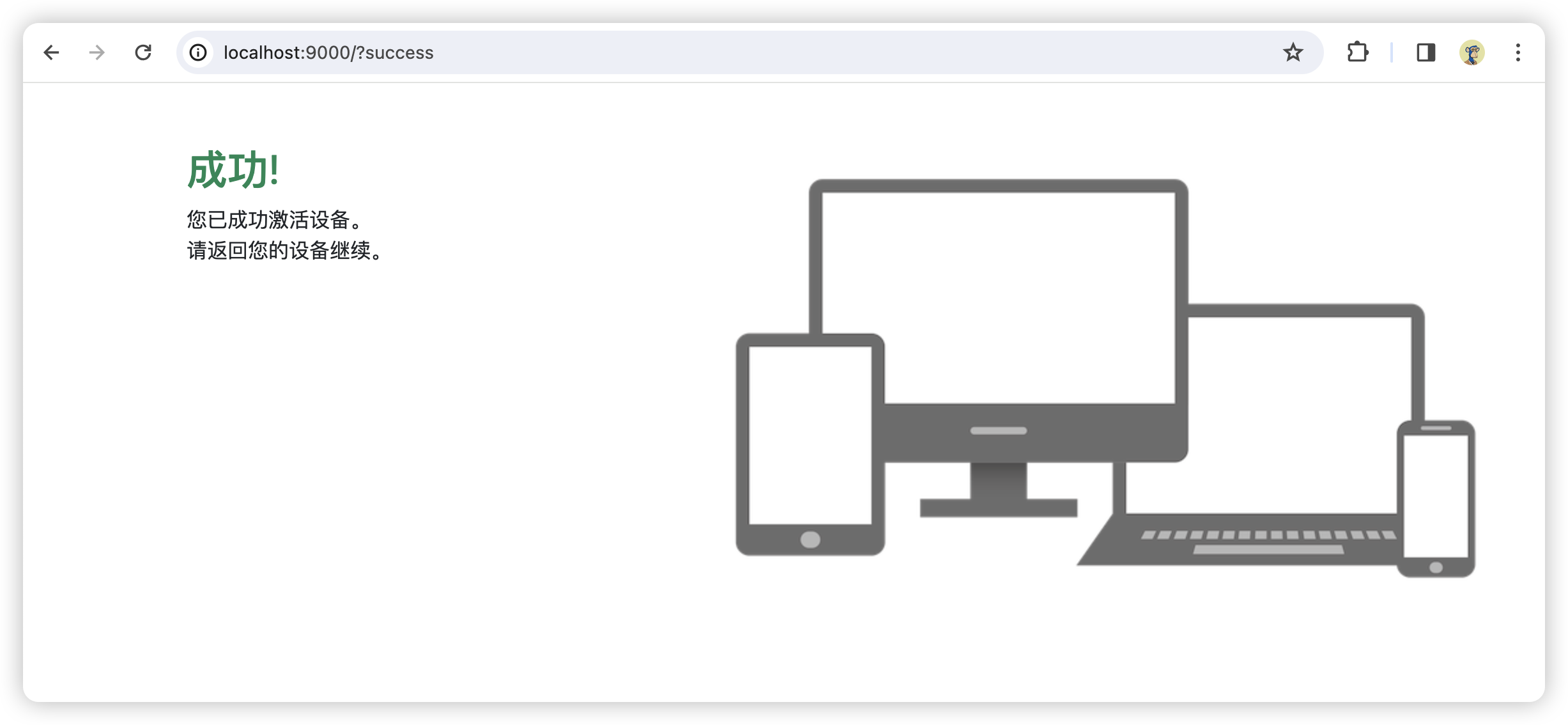
      <h2 class="text-success">成功!</h2>
      <p>
        您已成功激活设备。<br/>
        请返回您的设备继续。
      </p>
    </div>
    <div class="col-md-7">
      <img src="/assets/img/devices.png" th:src="@{/assets/img/devices.png}" class="img-responsive" alt="Devices">
    </div>
  </div>
</div>
</body>
</html>
复制 devices.png
文件目录:resources\static\assets\img\devices.png

device-activate.html页面中有用到该图片
添加 DeviceController.java
/*
 *    Copyright [yyyy] [name of copyright owner]
 *
 *    Licensed under the Apache License, Version 2.0 (the "License");
 *    you may not use this file except in compliance with the License.
 *    You may obtain a copy of the License at
 *
 *        http://www.apache.org/licenses/LICENSE-2.0
 *
 *    Unless required by applicable law or agreed to in writing, software
 *    distributed under the License is distributed on an "AS IS" BASIS,
 *    WITHOUT WARRANTIES OR CONDITIONS OF ANY KIND, either express or implied.
 *    See the License for the specific language governing permissions and
 *    limitations under the License.
 */

package com.pigcloud.pigx.auth.web;

import org.springframework.stereotype.Controller;
import org.springframework.web.bind.annotation.GetMapping;
import org.springframework.web.bind.annotation.RequestParam;

/**
 * @author Steve Riesenberg
 * @since 1.1
 */
@Controller
public class DeviceController {

    @GetMapping("/activate")
    public String activate(@RequestParam(value = "user_code", required = false) String userCode) {
        if (userCode != null) {
            return "redirect:/oauth2/device_verification?user_code=" + userCode;
        }
        return "device-activate";
    }

    @GetMapping("/activated")
    public String activated() {
        return "device-activated";
    }

    @GetMapping(value = "/", params = "success")
    public String success() {
        return "device-activated";
    }

}
修改 AuthorizationServerConfig.java
/*
 *    Copyright [yyyy] [name of copyright owner]
 *
 *    Licensed under the Apache License, Version 2.0 (the "License");
 *    you may not use this file except in compliance with the License.
 *    You may obtain a copy of the License at
 *
 *        http://www.apache.org/licenses/LICENSE-2.0
 *
 *    Unless required by applicable law or agreed to in writing, software
 *    distributed under the License is distributed on an "AS IS" BASIS,
 *    WITHOUT WARRANTIES OR CONDITIONS OF ANY KIND, either express or implied.
 *    See the License for the specific language governing permissions and
 *    limitations under the License.
 */

package com.pigcloud.pigx.auth.config;

import com.nimbusds.jose.jwk.JWKSet;
import com.nimbusds.jose.jwk.RSAKey;
import com.nimbusds.jose.jwk.source.ImmutableJWKSet;
import com.nimbusds.jose.jwk.source.JWKSource;
import com.nimbusds.jose.proc.SecurityContext;
import com.pigcloud.pigx.auth.authentication.DeviceClientAuthenticationConverter;
import com.pigcloud.pigx.auth.authentication.DeviceClientAuthenticationProvider;
import org.springframework.context.annotation.Bean;
import org.springframework.context.annotation.Configuration;
import org.springframework.core.Ordered;
import org.springframework.core.annotation.Order;
import org.springframework.http.MediaType;
import org.springframework.security.config.Customizer;
import org.springframework.security.config.annotation.web.builders.HttpSecurity;
import org.springframework.security.core.userdetails.User;
import org.springframework.security.core.userdetails.UserDetails;
import org.springframework.security.core.userdetails.UserDetailsService;
import org.springframework.security.oauth2.core.AuthorizationGrantType;
import org.springframework.security.oauth2.core.ClientAuthenticationMethod;
import org.springframework.security.oauth2.core.oidc.OidcScopes;
import org.springframework.security.oauth2.jwt.JwtDecoder;
import org.springframework.security.oauth2.server.authorization.InMemoryOAuth2AuthorizationConsentService;
import org.springframework.security.oauth2.server.authorization.OAuth2AuthorizationConsentService;
import org.springframework.security.oauth2.server.authorization.client.InMemoryRegisteredClientRepository;
import org.springframework.security.oauth2.server.authorization.client.RegisteredClient;
import org.springframework.security.oauth2.server.authorization.client.RegisteredClientRepository;
import org.springframework.security.oauth2.server.authorization.config.annotation.web.configuration.OAuth2AuthorizationServerConfiguration;
import org.springframework.security.oauth2.server.authorization.config.annotation.web.configurers.OAuth2AuthorizationServerConfigurer;
import org.springframework.security.oauth2.server.authorization.settings.AuthorizationServerSettings;
import org.springframework.security.oauth2.server.authorization.settings.ClientSettings;
import org.springframework.security.provisioning.InMemoryUserDetailsManager;
import org.springframework.security.web.SecurityFilterChain;
import org.springframework.security.web.authentication.LoginUrlAuthenticationEntryPoint;
import org.springframework.security.web.util.matcher.MediaTypeRequestMatcher;

import java.security.KeyPair;
import java.security.KeyPairGenerator;
import java.security.interfaces.RSAPrivateKey;
import java.security.interfaces.RSAPublicKey;
import java.util.UUID;

/**
 * 授权服务器配置
 *
 * @author heyuq
 */
@Configuration(proxyBeanMethods = false)
public class AuthorizationServerConfig {

    /**
     * 自定义同意授权页面。
     */
    private static final String CUSTOM_CONSENT_PAGE_URI = "/oauth2/consent";

    /**
     * 授权服务器端点配置
     *
     * @param http spring security核心配置类
     * @return 过滤器链
     * @throws Exception 抛出
     */
    @Bean
    @Order(Ordered.HIGHEST_PRECEDENCE)
    public SecurityFilterChain authorizationServerSecurityFilterChain(
            HttpSecurity http, RegisteredClientRepository registeredClientRepository,
            AuthorizationServerSettings authorizationServerSettings) throws Exception {

        // 应用OAuth2授权服务器的默认安全配置。
        OAuth2AuthorizationServerConfiguration.applyDefaultSecurity(http);

        DeviceClientAuthenticationConverter deviceClientAuthenticationConverter =
                new DeviceClientAuthenticationConverter(
                        authorizationServerSettings.getDeviceAuthorizationEndpoint());
        DeviceClientAuthenticationProvider deviceClientAuthenticationProvider =
                new DeviceClientAuthenticationProvider(registeredClientRepository);

        // 配置OAuth2授权服务器的安全过滤链,启用OpenID Connect 1.0。
        // OpenID Connect是OAuth 2.0的一个扩展,用于添加用户身份验证。
        http.getConfigurer(OAuth2AuthorizationServerConfigurer.class)
                // 设置设备码用户验证url(自定义用户验证页)
                .deviceAuthorizationEndpoint(deviceAuthorizationEndpoint ->
                        deviceAuthorizationEndpoint.verificationUri("/activate")
                )
                // 设置验证设备码用户确认页面
                .deviceVerificationEndpoint(deviceVerificationEndpoint ->
                        deviceVerificationEndpoint.consentPage(CUSTOM_CONSENT_PAGE_URI)
                )
                .clientAuthentication(clientAuthentication ->
                        // 客户端认证添加设备码的converter和provider
                        clientAuthentication
                                .authenticationConverter(deviceClientAuthenticationConverter)
                                .authenticationProvider(deviceClientAuthenticationProvider)
                )
                // 设置自定义用户确认授权页
                .authorizationEndpoint(authorizationEndpoint -> authorizationEndpoint
                        .consentPage(CUSTOM_CONSENT_PAGE_URI)
                )
                .oidc(Customizer.withDefaults());

        // @formatter:off
        http
            // 配置异常处理,当从授权端点未认证时,重定向到登录页面。
            // 这里定义了一个登录URL认证入口点,并指定它只适用于TEXT_HTML媒体类型。
            .exceptionHandling((exceptions) -> exceptions
                .defaultAuthenticationEntryPointFor(
                    new LoginUrlAuthenticationEntryPoint("/login"),
                    new MediaTypeRequestMatcher(MediaType.TEXT_HTML)
                )
            )
            // 配置OAuth2资源服务器,接受用户信息和/或客户端注册的访问令牌。
            // 这里使用JWT(JSON Web Tokens)作为访问令牌的格式。
            .oauth2ResourceServer((resourceServer) -> resourceServer
                .jwt(Customizer.withDefaults()));
        // @formatter:on

        // 构建并返回配置好的SecurityFilterChain对象。
        return http.build();
    }

    /**
     * 默认安全过滤器配置
     *
     * @param http spring security核心配置类
     * @return 过滤器链
     * @throws Exception 抛出
     */
    @Bean
    @Order(2)
    public SecurityFilterChain defaultSecurityFilterChain(HttpSecurity http)
            throws Exception {

        // @formatter:off
        http
            // 配置默认的HTTP请求授权规则,要求所有请求都必须经过身份验证。
            .authorizeHttpRequests((authorize) -> authorize
                // 放行静态资源
                .requestMatchers("favicon.svg", "/assets/**", "/webjars/**", "/error").permitAll()
                .anyRequest().authenticated()
            )
            // 配置表单登录,使用默认设置。
            // 这处理从授权服务器过滤链重定向到登录页面的情况。
            // .formLogin(Customizer.withDefaults())
            .formLogin(formLogin ->
                formLogin
                    .loginPage("/login")
                    .permitAll()
            );
        // @formatter:on

        return http.build();
    }

    /**
     * 先暂时配置一个基于内存的用户,框架在用户认证时会默认调用
     * {@link UserDetailsService#loadUserByUsername(String)} 方法根据
     * 账号查询用户信息,一般是重写该方法实现自己的逻辑
     *
     * @return UserDetailsService
     */
    @Bean
    public UserDetailsService userDetailsService() {

        // 创建一个具有默认密码编码器的用户详情对象。
        // 这里定义了一个用户名为"admin",密码为"password",角色为"ADMIN"的用户。
        UserDetails userDetails = User.withUsername("admin")
                .password("{bcrypt}$2a$10$dXJ3SW6G7P50lGmMkkmwe.20cQQubK3.HZWzG3YB1tlRy.fqvM/BG")
                .roles("ADMIN")
                .authorities("message_read", "message_write")
                .build();

        // 返回一个基于内存的用户详情服务,它仅包含上面定义的用户。
        return new InMemoryUserDetailsManager(userDetails);
    }

    /**
     * 注册一个 OAuth 2.0客户端
     *
     * @return RegisteredClientRepository实例
     */
    @Bean
    public RegisteredClientRepository registeredClientRepository() {
        // 创建一个RegisteredClient对象,并设置其属性。
        // 使用UUID生成一个唯一的客户端ID。
        RegisteredClient registeredClient = RegisteredClient.withId(UUID.randomUUID().toString())
                // 设置客户端ID为"messaging-client"。
                .clientId("messaging-client")
                // 设置客户端秘密为"{noop}secret",这里的"{noop}"表示不加密。
                .clientSecret("{noop}secret")
                // 设置客户端认证方法为基于客户端秘密的基本认证。
                .clientAuthenticationMethod(ClientAuthenticationMethod.CLIENT_SECRET_BASIC)
                // 设置授权类型为授权码。
                .authorizationGrantType(AuthorizationGrantType.AUTHORIZATION_CODE)
                // 添加刷新令牌授权类型。
                .authorizationGrantType(AuthorizationGrantType.REFRESH_TOKEN)
                // 添加客户端凭证授权类型。
                .authorizationGrantType(AuthorizationGrantType.CLIENT_CREDENTIALS)
                // 设置授权码流程的重定向URI。
                .redirectUri("http://127.0.0.1:8080/login/oauth2/code/messaging-client-oidc")
                // 设置另一个重定向URI,可能用于其他授权流程。
                .redirectUri("http://127.0.0.1:8080/authorized")
                // 仅用于测试,接收授权码。
                .redirectUri("https://www.pigx.cn")
                // 设置用户注销后的重定向URI。
                .postLogoutRedirectUri("http://127.0.0.1:8080/logged-out")
                // 添加OpenID范围。
                .scope(OidcScopes.OPENID)
                // 添加Profile范围。
                .scope(OidcScopes.PROFILE)
                // 添加自定义范围"message.read"。
                .scope("message.read")
                // 添加自定义范围"message.write"。
                .scope("message.write")
                // 设置客户端设置,要求每次都需要用户授权同意。
                .clientSettings(ClientSettings.builder().requireAuthorizationConsent(true).build())
                .build(); // 构建RegisteredClient对象。

        // 创建另一个RegisteredClient对象,名为deviceClient,用于设备授权
        RegisteredClient deviceClient = RegisteredClient.withId(UUID.randomUUID().toString())
                .clientId("device-messaging-client")
                // 公共客户端
                .clientAuthenticationMethod(ClientAuthenticationMethod.NONE)
                // 设备码授权
                .authorizationGrantType(AuthorizationGrantType.DEVICE_CODE)
                .authorizationGrantType(AuthorizationGrantType.REFRESH_TOKEN)
                // 自定scope
                .scope("message.read")
                .scope("message.write")
                .build();

        // 使用上面创建的RegisteredClient对象,创建一个新的InMemoryRegisteredClientRepository实例,并返回它。
        // InMemoryRegisteredClientRepository是一个简单的内存中的存储库,用于存储和检索RegisteredClient对象。
        return new InMemoryRegisteredClientRepository(registeredClient, deviceClient);
    }

    /**
     * 存储新授权同意和查询现有授权同意的核心组件。它主要由实现 OAuth2 授权请求流(例如 authorization_code 授权)的组件使用
     *
     * @return JdbcOAuth2AuthorizationConsentService
     */
    @Bean
    public OAuth2AuthorizationConsentService authorizationConsentService() {
        // Will be used by the ConsentController
        return new InMemoryOAuth2AuthorizationConsentService();
    }

    /**
     * 配置jwk源,使用非对称加密,公开用于检索匹配指定选择器的JWK的方法
     *
     * @return JWKSource
     */
    @Bean
    public JWKSource<SecurityContext> jwkSource() {
        // 生成RSA密钥对。
        KeyPair keyPair = generateRsaKey();

        // 从密钥对中获取公钥。
        RSAPublicKey publicKey = (RSAPublicKey) keyPair.getPublic();

        // 从密钥对中获取私钥。
        RSAPrivateKey privateKey = (RSAPrivateKey) keyPair.getPrivate();

        // 使用公钥和私钥创建一个RSAKey对象,并为其分配一个随机的UUID作为keyID。
        RSAKey rsaKey = new RSAKey.Builder(publicKey)
                .privateKey(privateKey)
                .keyID(UUID.randomUUID().toString())
                .build();

        // 创建一个包含这个RSAKey的JWKSet对象。
        JWKSet jwkSet = new JWKSet(rsaKey);

        // 返回一个不可变的JWKSet对象,这通常是为了保证安全而设计的。
        return new ImmutableJWKSet<>(jwkSet);
    }

    /**
     * 私有方法,用于生成RSA密钥对。
     *
     * @return KeyPair
     */
    private static KeyPair generateRsaKey() {
        KeyPair keyPair;
        try {
            // 实例化一个RSA密钥对生成器。
            KeyPairGenerator keyPairGenerator = KeyPairGenerator.getInstance("RSA");

            // 初始化密钥对生成器,指定密钥长度为2048位。
            keyPairGenerator.initialize(2048);

            // 生成RSA密钥对。
            keyPair = keyPairGenerator.generateKeyPair();
        } catch (Exception ex) {
            // 如果发生异常,则抛出IllegalStateException。
            throw new IllegalStateException(ex);
        }
        // 返回生成的密钥对。
        return keyPair;
    }

    /**
     * 用于解码签名访问令牌的 JwtDecoder 实例。
     *
     * @param jwkSource jwk源
     * @return JwtDecoder
     */
    @Bean
    public JwtDecoder jwtDecoder(JWKSource<SecurityContext> jwkSource) {
        // 使用OAuth2AuthorizationServerConfiguration类中的静态方法jwtDecoder,
        // 根据提供的JWKSource对象创建JwtDecoder。
        // JwtDecoder是用于解码JWT的组件。
        return OAuth2AuthorizationServerConfiguration.jwtDecoder(jwkSource);
    }

    /**
     * 配置OAuth 2.0授权服务器。
     *
     * @return AuthorizationServerSettings
     */
    @Bean
    public AuthorizationServerSettings authorizationServerSettings() {
        // 创建一个AuthorizationServerSettings对象,并使用默认设置。
        // 这个对象通常用于配置授权服务器的各种设置。
        return AuthorizationServerSettings.builder().build();
    }

}
测试设备码流程
授权码流程详见rfc8628
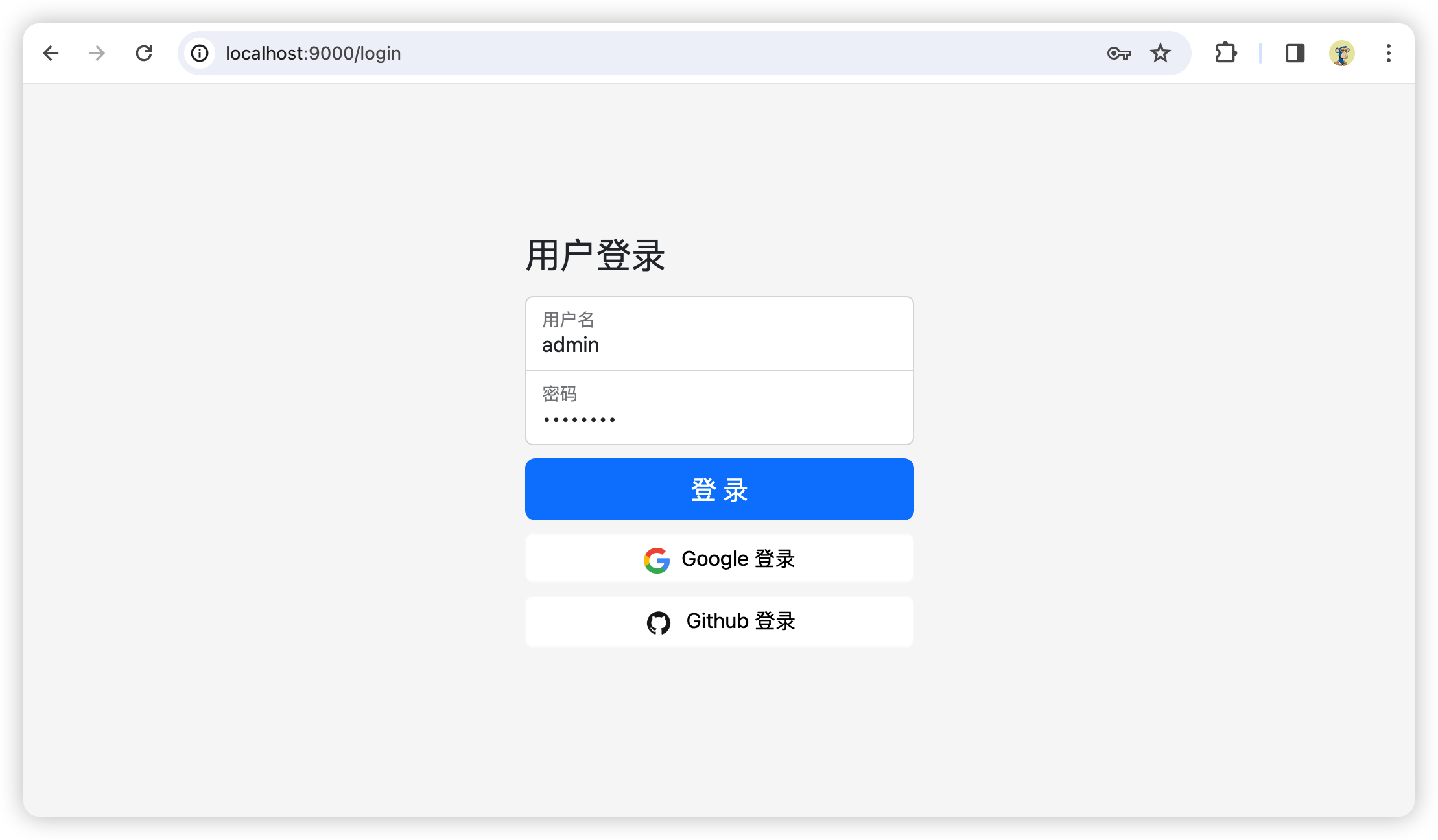
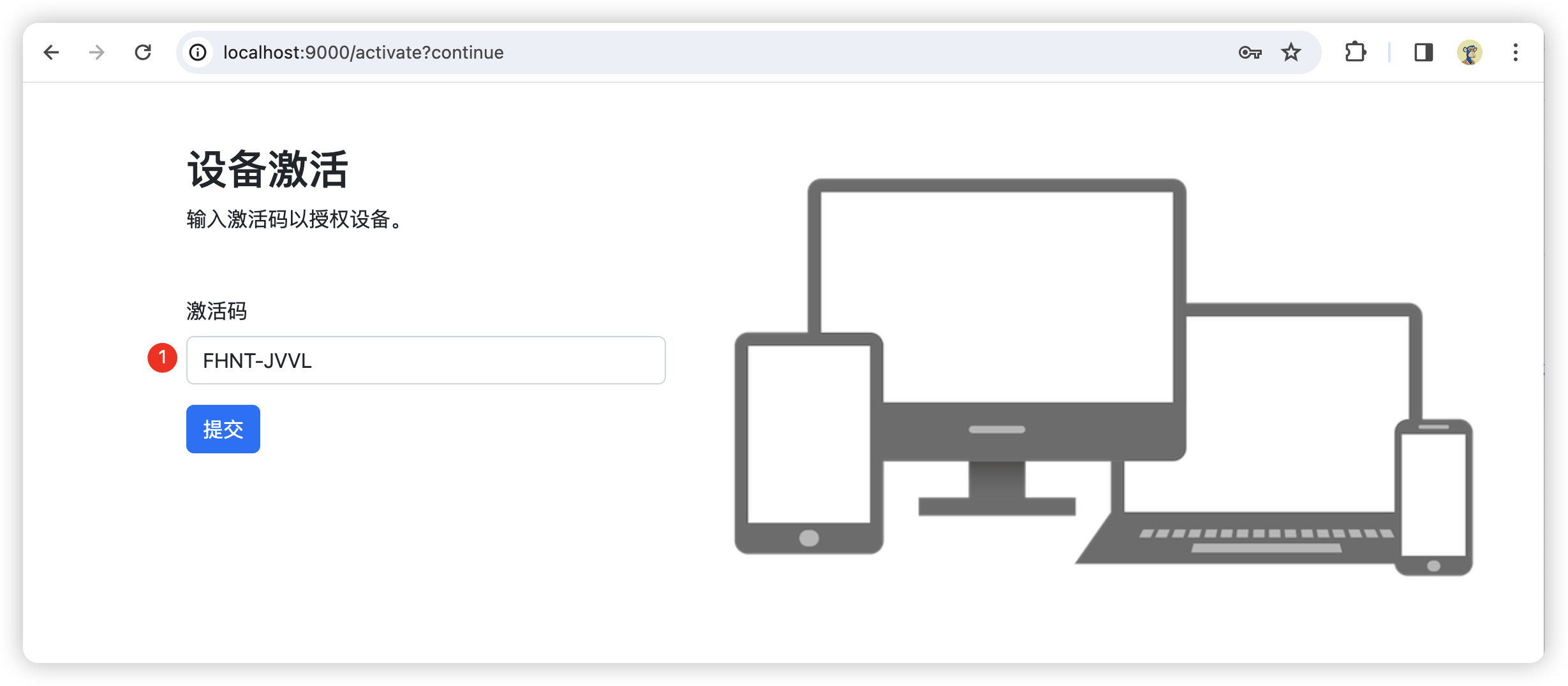
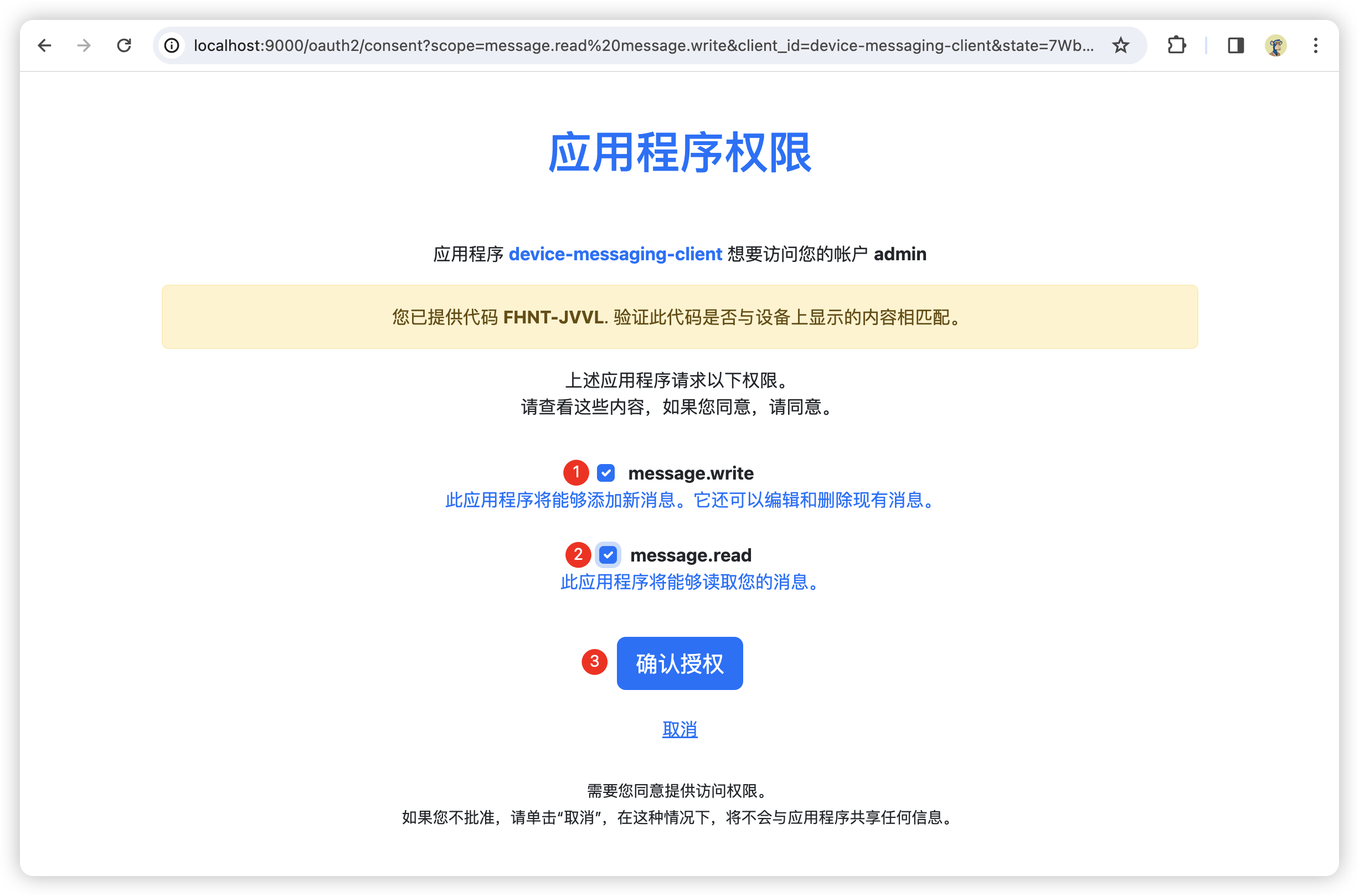
首先,用户请求/oauth2/device_authorization接口,获取user_code、设备码和给用户在浏览器访问的地址,用户在浏览器打开地址,输入user_code,如果用户尚未登录则需要进行登录;输入user_code之后如果该客户端当前用户尚未授权则重定向至授权确认页面;授权完成后设备通过设备码换取token,设备一般是在给出用户验证地址后轮训携带设备码访问/oauth2/token接口,如果用户尚未验证时访问则会响应"authorization_pending",详见:rfc8628#section-3.5
设备发起授权请求
携带要求的参数请求/oauth2/device_authorization接口
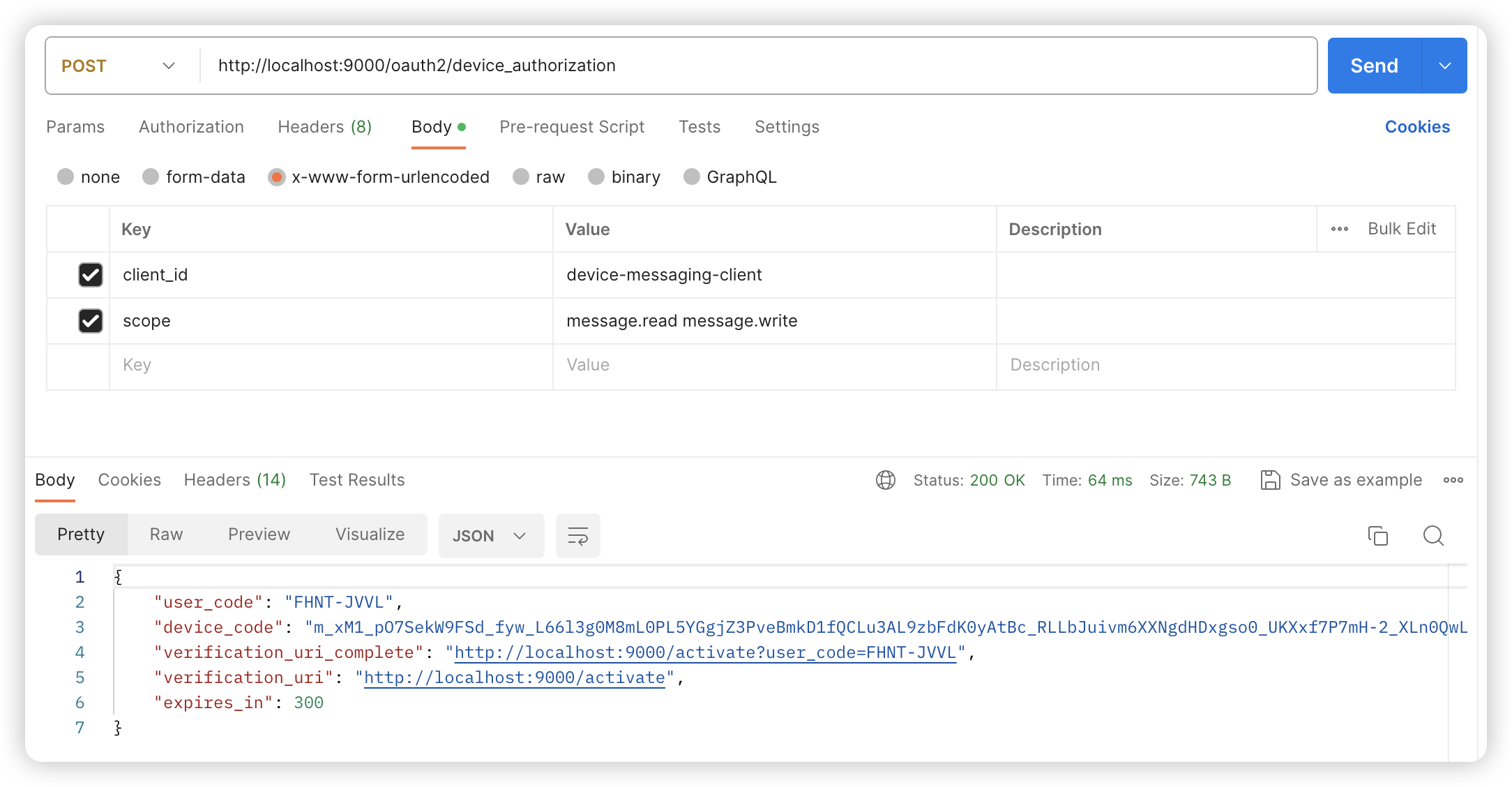
代码片段
curl --location 'http://localhost:9000/oauth2/device_authorization' \
--header 'Content-Type: application/x-www-form-urlencoded' \
--data-urlencode 'client_id=device-messaging-client' \
--data-urlencode 'scope=message.read message.write'
响应结果
{
  "user_code": "FHNT-JVVL",
  "device_code": "m_xM1_pO7SekW9FSd_fyw_L66l3g0M8mL0PL5YGgjZ3PveBmkD1fQCLu3AL9zbFdK0yAtBc_RLLbJuivm6XXNgdHDxgso0_UKXxf7P7mH-2_XLn0QwLTvoV7onGSgvSI",
  "verification_uri_complete": "http://localhost:9000/activate?user_code=FHNT-JVVL",
  "verification_uri": "http://localhost:9000/activate",
  "expires_in": 300
}
请求参数说明
- client_id: 客户端id
- scope: 设备请求授权的范围
响应参数说明
- user_code: 用户在浏览器打开验证地址时输入的内容
- device_code:设备码,用该值换取token
- verification_uri_complete:用户在浏览器打开的验证地址,页面会自动获取参数并提交表单
- verification_uri:验证地址,需要用户输入user_code
- expires_in:过期时间,单位(秒)
用户授权
访问verification_uri或者verification_uri_complete
未登录,跳转至登录页
设备端激活,输入user_code并提交
重定向至用户授权确认页面
该客户端用户尚未确认过,重定向至授权确认页面,勾选scope后提交
授权成功后跳转至成功页面
设备访问令牌请求
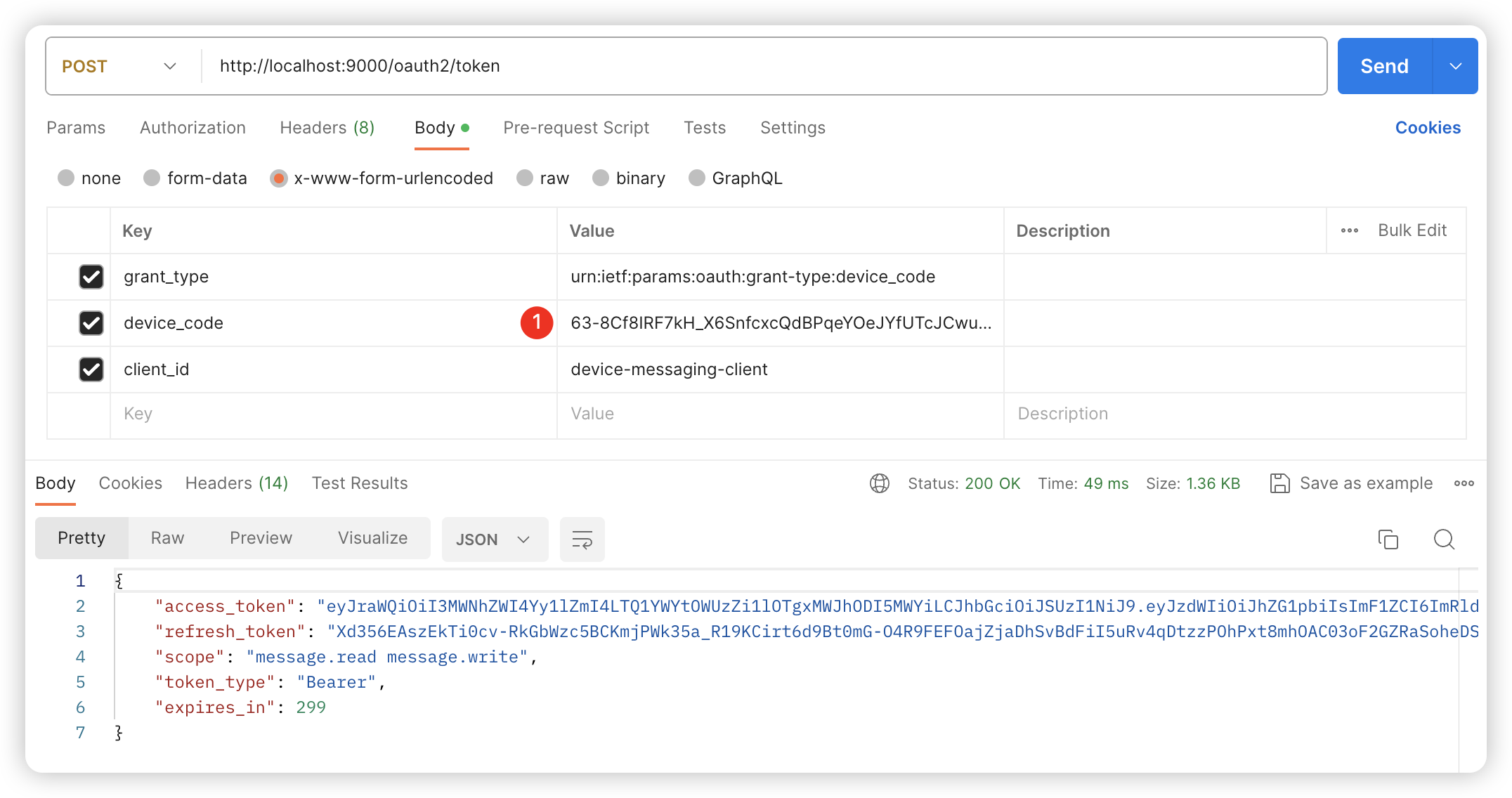
设备发起请求用设备码换取token,请求/oauth2/token接口
postman 模拟设备请求
代码片段
curl --location 'http://localhost:9000/oauth2/token' \
--header 'Content-Type: application/x-www-form-urlencoded' \
--data-urlencode 'grant_type=urn:ietf:params:oauth:grant-type:device_code' \
--data-urlencode 'device_code=63-8Cf8IRF7kH_X6SnfcxcQdBPqeYOeJYfUTcJCwu2OhgN7rs4o7kDM1vvcoDlUggPNth-BUyqff7SXvUhKjpGxs8qQYiyec-gte3RpKJc4Phjhxa9NNYU7rr_1_Df_b' \
--data-urlencode 'client_id=device-messaging-client'
响应结果
{
  "access_token": "eyJraWQiOiI3MWNhZWI4Yy1lZmI4LTQ1YWYtOWUzZi1lOTgxMWJhODI5MWYiLCJhbGciOiJSUzI1NiJ9.eyJzdWIiOiJhZG1pbiIsImF1ZCI6ImRldmljZS1tZXNzYWdpbmctY2xpZW50IiwibmJmIjoxNzA4ODcwMDQwLCJzY29wZSI6WyJtZXNzYWdlLnJlYWQiLCJtZXNzYWdlLndyaXRlIl0sImlzcyI6Imh0dHA6Ly9sb2NhbGhvc3Q6OTAwMCIsImV4cCI6MTcwODg3MDM0MCwiaWF0IjoxNzA4ODcwMDQwLCJqdGkiOiJjYjYyNGQ5YS0wYzlmLTRjM2EtODM2OS02NDdlY2Y4MGM3MmEifQ.evHY6D1wv3NSLlPnnETRhlcXR-yS8lZTF7bRMqRKn53UmvdXubkwu0sJiWUHqMjHJBDSERTcyLEtR1njMYfknCdC6L0xhdVjnG-2HO3RzpztC3EyJt8AX82rMFrWMYL5VOWJNP_iCYWaXj0Fvz1WRu1KICPMee2bofJb1wNk5gD9hQNFypl3v5iE1FDse_CPLnUtXxL3i1ls-KC_z7VTM0ryGyS1pQHyEU4SrA8kHqlApH6RZDsvXf0e9-JxUivZl0HlPnPLLR92TDNIDATy1xDRrA1M8DLMhiAJHpQ2wfjwustY72Sypu4M0VByTMV4_9BI-bNVNiPuG10R_bly-w",
  "refresh_token": "Xd356EAszEkTi0cv-RkGbWzc5BCKmjPWk35a_R19KCirt6d9Bt0mG-O4R9FEFOajZjaDhSvBdFiI5uRv4qDtzzPOhPxt8mhOAC03oF2GZRaSoheDSAl1taWsLaDiZo4z",
  "scope": "message.read message.write",
  "token_type": "Bearer",
  "expires_in": 299
}
这里我是重新获取了一个,之前的过期了,使用过期设备码请求如下所示
{
    "error": "access_denied",
    "error_uri": "https://datatracker.ietf.org/doc/html/rfc8628#section-3.5"
}
用户尚未验证时使用设备码请求如下
{
    "error": "authorization_pending",
    "error_uri": "https://datatracker.ietf.org/doc/html/rfc8628#section-3.5"
}
请求参数说明
- client_id:客户端id
- device_code:请求/oauth2/device_authorization接口返回的设备码(device_code)
- grant_type:在设备码模式固定是urn:ietf:params:oauth:grant-type:device_code
至此,自定义设备码流程结束
写在最后
设备码流程一般使用在不便输入的设备上,设备提供一个链接给用户验证,用户在其它设备的浏览器中认证;其它的三方服务需要接入时就比较适合授权码模式,桌面客户端、移动app和前端应用就比较适合pkce流程,pkce靠随机生成的Code Verifier和Code Challenge来保证流程的安全,无法让他人拆包获取clientId和clientSecret来伪造登录信息;至于用户登录时输入的账号和密码只能通过升级https来防止拦截请求获取用户密码。