
扩展实现 OAuth2 密码模式
Spring 官方文档
OAuth2ResourceOwnerPasswordAuthenticationToken.java
java
/*
 *    Copyright (c) 2023-2024 pigcloud Authors. All Rights Reserved.
 *
 *    Licensed under the Apache License, Version 2.0 (the "License");
 *    you may not use this file except in compliance with the License.
 *    You may obtain a copy of the License at
 *
 *        https://www.apache.org/licenses/LICENSE-2.0
 *
 *    Unless required by applicable law or agreed to in writing, software
 *    distributed under the License is distributed on an "AS IS" BASIS,
 *    WITHOUT WARRANTIES OR CONDITIONS OF ANY KIND, either express or implied.
 *    See the License for the specific language governing permissions and
 *    limitations under the License.
 */

package com.pigcloud.pigx.auth.support.password;

import lombok.Getter;
import org.springframework.lang.Nullable;
import org.springframework.security.core.Authentication;
import org.springframework.security.oauth2.core.AuthorizationGrantType;
import org.springframework.security.oauth2.core.endpoint.OAuth2ParameterNames;
import org.springframework.security.oauth2.server.authorization.authentication.OAuth2AuthorizationGrantAuthenticationToken;
import org.springframework.util.Assert;

import java.util.Collections;
import java.util.HashSet;
import java.util.Map;
import java.util.Set;

/**
 * 密码授权模式身份验证令牌(包含用户名和密码等).
 *
 * @author He Yuqiang
 * @since 3.0.0
 */
@Getter
public class OAuth2ResourceOwnerPasswordAuthenticationToken extends OAuth2AuthorizationGrantAuthenticationToken {

    /**
     * 授权模式.
     */
    public static final AuthorizationGrantType PASSWORD = new AuthorizationGrantType("password");

    /**
     * 令牌申请访问范围.
     */
    private final Set<String> scopes;

    /**
     * 密码模式身份验证令牌.
     * @param clientPrincipal 客户端信息
     * @param scopes 令牌申请访问范围
     * @param additionalParameters 自定义额外参数(用户名和密码)
     */
    public OAuth2ResourceOwnerPasswordAuthenticationToken(Authentication clientPrincipal, @Nullable Set<String> scopes,
            Map<String, Object> additionalParameters) {
        super(PASSWORD, clientPrincipal, additionalParameters);
        Assert.notNull(clientPrincipal, "clientPrincipal cannot be null");
        this.scopes = Collections.unmodifiableSet(scopes != null ? new HashSet<>(scopes) : Collections.emptySet());
    }

    /**
     * 用户凭证(密码).
     */
    @Override
    public Object getCredentials() {
        return this.getAdditionalParameters().get(OAuth2ParameterNames.PASSWORD);
    }

}
OAuth2ResourceOwnerPasswordAuthenticationConverter.java
java
/*
 *    Copyright (c) 2023-2024 pigcloud Authors. All Rights Reserved.
 *
 *    Licensed under the Apache License, Version 2.0 (the "License");
 *    you may not use this file except in compliance with the License.
 *    You may obtain a copy of the License at
 *
 *        https://www.apache.org/licenses/LICENSE-2.0
 *
 *    Unless required by applicable law or agreed to in writing, software
 *    distributed under the License is distributed on an "AS IS" BASIS,
 *    WITHOUT WARRANTIES OR CONDITIONS OF ANY KIND, either express or implied.
 *    See the License for the specific language governing permissions and
 *    limitations under the License.
 */

package com.pigcloud.pigx.auth.support.password;

import com.pigcloud.pigx.common.security.utils.OAuth2EndpointUtils;
import jakarta.servlet.http.HttpServletRequest;
import org.springframework.security.core.Authentication;
import org.springframework.security.core.context.SecurityContextHolder;
import org.springframework.security.oauth2.core.AuthorizationGrantType;
import org.springframework.security.oauth2.core.OAuth2ErrorCodes;
import org.springframework.security.oauth2.core.endpoint.OAuth2ParameterNames;
import org.springframework.security.web.authentication.AuthenticationConverter;
import org.springframework.util.MultiValueMap;
import org.springframework.util.StringUtils;

import java.util.Arrays;
import java.util.HashMap;
import java.util.HashSet;
import java.util.Map;
import java.util.Set;

/**
 * 密码模式参数解析器.
 * <p>
 * 解析请求参数中的用户名和密码,并构建相应的身份验证(Authentication)对象
 *
 * @author He Yuqiang
 * @see org.springframework.security.oauth2.server.authorization.web.authentication.OAuth2AuthorizationCodeAuthenticationConverter
 * @see org.springframework.security.oauth2.server.authorization.web.authentication.OAuth2AuthorizationCodeRequestAuthenticationConverter
 */
public class OAuth2ResourceOwnerPasswordAuthenticationConverter implements AuthenticationConverter {

    @Override
    public Authentication convert(HttpServletRequest request) {

        // 参数提取验证
        MultiValueMap<String, String> parameters = OAuth2EndpointUtils.getFormParameters(request);

        // 授权类型 (必需)
        String grantType = parameters.getFirst(OAuth2ParameterNames.GRANT_TYPE);
        if (!AuthorizationGrantType.PASSWORD.getValue().equals(grantType)) {
            return null;
        }

        // 客户端信息
        Authentication clientPrincipal = SecurityContextHolder.getContext().getAuthentication();

        // 令牌申请访问范围验证 (可选)
        Set<String> scopes = null;
        String scope = parameters.getFirst(OAuth2ParameterNames.SCOPE);
        if (StringUtils.hasText(scope) && parameters.get(OAuth2ParameterNames.SCOPE).size() != 1) {
            OAuth2EndpointUtils.throwError(OAuth2ErrorCodes.INVALID_REQUEST, OAuth2ParameterNames.SCOPE,
                    OAuth2EndpointUtils.ACCESS_TOKEN_REQUEST_ERROR_URI);
        }
        if (StringUtils.hasText(scope)) {
            scopes = new HashSet<>(Arrays.asList(StringUtils.delimitedListToStringArray(scope, " ")));
        }

        // 用户名验证(必需)
        String username = parameters.getFirst(OAuth2ParameterNames.USERNAME);
        if (!StringUtils.hasText(username) || parameters.get(OAuth2ParameterNames.USERNAME).size() != 1) {
            OAuth2EndpointUtils.throwError(OAuth2ErrorCodes.INVALID_REQUEST, OAuth2ParameterNames.USERNAME,
                    OAuth2EndpointUtils.ACCESS_TOKEN_REQUEST_ERROR_URI);
        }

        // 密码验证(必需)
        String password = parameters.getFirst(OAuth2ParameterNames.PASSWORD);
        if (!StringUtils.hasText(password) || parameters.get(OAuth2ParameterNames.PASSWORD).size() != 1) {
            OAuth2EndpointUtils.throwError(OAuth2ErrorCodes.INVALID_REQUEST, OAuth2ParameterNames.PASSWORD,
                    OAuth2EndpointUtils.ACCESS_TOKEN_REQUEST_ERROR_URI);
        }

        // 附加参数(保存用户名/密码传递给 PasswordAuthenticationProvider 用于身份认证)
        Map<String, Object> additionalParameters = new HashMap<>();
        parameters.forEach((key, value) -> {
            if (!key.equals(OAuth2ParameterNames.GRANT_TYPE) && !key.equals(OAuth2ParameterNames.CLIENT_ID)
                    && !key.equals(OAuth2ParameterNames.SCOPE)) {
                additionalParameters.put(key, value.get(0));
            }
        });

        return new OAuth2ResourceOwnerPasswordAuthenticationToken(clientPrincipal, scopes, additionalParameters);
    }

}
OAuth2ResourceOwnerPasswordAuthenticationProvider.java
java
/*
 *    Copyright (c) 2023-2024 pigcloud Authors. All Rights Reserved.
 *
 *    Licensed under the Apache License, Version 2.0 (the "License");
 *    you may not use this file except in compliance with the License.
 *    You may obtain a copy of the License at
 *
 *        https://www.apache.org/licenses/LICENSE-2.0
 *
 *    Unless required by applicable law or agreed to in writing, software
 *    distributed under the License is distributed on an "AS IS" BASIS,
 *    WITHOUT WARRANTIES OR CONDITIONS OF ANY KIND, either express or implied.
 *    See the License for the specific language governing permissions and
 *    limitations under the License.
 */

package com.pigcloud.pigx.auth.support.password;

import com.pigcloud.pigx.auth.utils.OAuth2AuthenticationProviderUtils;
import com.pigcloud.pigx.common.security.utils.OAuth2EndpointUtils;
import org.springframework.security.authentication.AuthenticationManager;
import org.springframework.security.authentication.AuthenticationProvider;
import org.springframework.security.authentication.UsernamePasswordAuthenticationToken;
import org.springframework.security.core.Authentication;
import org.springframework.security.core.AuthenticationException;
import org.springframework.security.oauth2.core.AuthorizationGrantType;
import org.springframework.security.oauth2.core.ClaimAccessor;
import org.springframework.security.oauth2.core.OAuth2AccessToken;
import org.springframework.security.oauth2.core.OAuth2AuthenticationException;
import org.springframework.security.oauth2.core.OAuth2Error;
import org.springframework.security.oauth2.core.OAuth2ErrorCodes;
import org.springframework.security.oauth2.core.OAuth2RefreshToken;
import org.springframework.security.oauth2.core.OAuth2Token;
import org.springframework.security.oauth2.core.endpoint.OAuth2ParameterNames;
import org.springframework.security.oauth2.server.authorization.OAuth2Authorization;
import org.springframework.security.oauth2.server.authorization.OAuth2AuthorizationService;
import org.springframework.security.oauth2.server.authorization.OAuth2TokenType;
import org.springframework.security.oauth2.server.authorization.authentication.OAuth2AccessTokenAuthenticationToken;
import org.springframework.security.oauth2.server.authorization.authentication.OAuth2ClientAuthenticationToken;
import org.springframework.security.oauth2.server.authorization.client.RegisteredClient;
import org.springframework.security.oauth2.server.authorization.context.AuthorizationServerContextHolder;
import org.springframework.security.oauth2.server.authorization.token.DefaultOAuth2TokenContext;
import org.springframework.security.oauth2.server.authorization.token.OAuth2TokenContext;
import org.springframework.security.oauth2.server.authorization.token.OAuth2TokenGenerator;
import org.springframework.util.Assert;

import java.security.Principal;
import java.util.Map;
import java.util.Set;

/**
 * 密码模式身份验证提供者.
 * <p>
 * 处理基于用户名和密码的身份验证
 *
 * @author He yuqiang
 * @see org.springframework.security.oauth2.server.authorization.authentication.OAuth2AuthorizationCodeAuthenticationProvider
 * @see org.springframework.security.oauth2.server.authorization.authentication.OAuth2AuthorizationCodeRequestAuthenticationValidator
 */
public class OAuth2ResourceOwnerPasswordAuthenticationProvider implements AuthenticationProvider {

    private static final String ERROR_URI = "https://datatracker.ietf.org/doc/html/rfc6749#section-5.2";

    private final AuthenticationManager authenticationManager;

    private final OAuth2AuthorizationService authorizationService;

    private final OAuth2TokenGenerator<? extends OAuth2Token> tokenGenerator;

    /**
     * Constructs an {@code OAuth2ResourceOwnerPasswordAuthenticationProviderNew} using
     * the provided parameters.
     * @param authenticationManager the authentication manager
     * @param authorizationService the authorization service
     * @param tokenGenerator the token generator
     */
    public OAuth2ResourceOwnerPasswordAuthenticationProvider(AuthenticationManager authenticationManager,
            OAuth2AuthorizationService authorizationService,
            OAuth2TokenGenerator<? extends OAuth2Token> tokenGenerator) {
        Assert.notNull(authorizationService, "authorizationService cannot be null");
        Assert.notNull(tokenGenerator, "tokenGenerator cannot be null");
        this.authenticationManager = authenticationManager;
        this.authorizationService = authorizationService;
        this.tokenGenerator = tokenGenerator;
    }

    /**
     * Performs authentication with the same contract as
     * {@link AuthenticationManager#authenticate(Authentication)} .
     * @param authentication the authentication request object.
     * @return a fully authenticated object including credentials. May return
     * <code>null</code> if the <code>AuthenticationProvider</code> is unable to support
     * authentication of the passed <code>Authentication</code> object. In such a case,
     * the next <code>AuthenticationProvider</code> that supports the presented
     * <code>Authentication</code> class will be tried.
     * @throws AuthenticationException if authentication fails.
     */
    @Override
    public Authentication authenticate(Authentication authentication) throws AuthenticationException {
        OAuth2ResourceOwnerPasswordAuthenticationToken resourceOwnerPasswordAuthentication = (OAuth2ResourceOwnerPasswordAuthenticationToken) authentication;

        // 确保客户端已通过身份验证
        OAuth2ClientAuthenticationToken clientPrincipal = OAuth2AuthenticationProviderUtils
            .getAuthenticatedClientElseThrowInvalidClient(resourceOwnerPasswordAuthentication);
        RegisteredClient registeredClient = clientPrincipal.getRegisteredClient();

        // 确保客户端配置为使用此授权授予类型(grant_type=password)
        assert registeredClient != null;
        if (!registeredClient.getAuthorizationGrantTypes()
            .contains(resourceOwnerPasswordAuthentication.getGrantType())) {
            throw new OAuth2AuthenticationException(OAuth2ErrorCodes.UNAUTHORIZED_CLIENT);
        }

        // 生成用户名密码身份验证令牌
        Map<String, Object> additionalParameters = resourceOwnerPasswordAuthentication.getAdditionalParameters();
        String username = (String) additionalParameters.get(OAuth2ParameterNames.USERNAME);
        String password = (String) additionalParameters.get(OAuth2ParameterNames.PASSWORD);

        UsernamePasswordAuthenticationToken usernamePasswordAuthenticationToken = new UsernamePasswordAuthenticationToken(
                username, password);

        // 用户名密码身份验证,成功后返回带有权限的认证信息
        Authentication usernamePasswordAuthentication;
        try {
            usernamePasswordAuthentication = this.authenticationManager
                .authenticate(usernamePasswordAuthenticationToken);
        }
        catch (Exception e) {
            // 需要将其他类型的异常转换为 OAuth2AuthenticationException 才能被自定义异常捕获处理,逻辑源码
            // OAuth2TokenEndpointFilter#doFilterInternal
            throw new OAuth2AuthenticationException(e.getCause() != null ? e.getCause().getMessage() : e.getMessage());
        }

        // 验证申请访问范围(Scope)
        Set<String> requestedScopes = resourceOwnerPasswordAuthentication.getScopes();
        Set<String> allowedScopes = registeredClient.getScopes();
        if (!requestedScopes.isEmpty() && !allowedScopes.containsAll(requestedScopes)) {
            OAuth2EndpointUtils.throwError(OAuth2ErrorCodes.INVALID_SCOPE, OAuth2ParameterNames.USERNAME,
                    OAuth2EndpointUtils.ACCESS_TOKEN_REQUEST_ERROR_URI);
        }

        // 访问令牌(Access Token) 构造器
        DefaultOAuth2TokenContext.Builder tokenContextBuilder = DefaultOAuth2TokenContext.builder()
            .registeredClient(registeredClient)
            // 身份验证成功的认证信息(用户名、权限等信息)
            .principal(usernamePasswordAuthentication)
            .authorizationServerContext(AuthorizationServerContextHolder.getContext())
            .authorizedScopes(resourceOwnerPasswordAuthentication.getScopes())
            // 授权方式
            .authorizationGrantType(resourceOwnerPasswordAuthentication.getGrantType())
            // 授权具体对象
            .authorizationGrant(resourceOwnerPasswordAuthentication);

        // 生成访问令牌(Access Token)
        // ----- Access token -----
        OAuth2TokenContext tokenContext = tokenContextBuilder.tokenType(OAuth2TokenType.ACCESS_TOKEN).build();
        OAuth2Token generatedAccessToken = this.tokenGenerator.generate(tokenContext);
        if (generatedAccessToken == null) {
            OAuth2Error error = new OAuth2Error(OAuth2ErrorCodes.SERVER_ERROR,
                    "The token generator failed to generate the access token.", ERROR_URI);
            throw new OAuth2AuthenticationException(error);
        }

        // Initialize the OAuth2Authorization
        OAuth2Authorization.Builder authorizationBuilder = OAuth2Authorization.withRegisteredClient(registeredClient)
            .principalName(usernamePasswordAuthentication.getName())
            .authorizationGrantType(resourceOwnerPasswordAuthentication.getGrantType())
            .authorizedScopes(requestedScopes)
            .attribute(Principal.class.getName(), usernamePasswordAuthentication);

        OAuth2AccessToken accessToken = new OAuth2AccessToken(OAuth2AccessToken.TokenType.BEARER,
                generatedAccessToken.getTokenValue(), generatedAccessToken.getIssuedAt(),
                generatedAccessToken.getExpiresAt(), tokenContext.getAuthorizedScopes());
        if (generatedAccessToken instanceof ClaimAccessor) {
            authorizationBuilder.token(accessToken,
                    (metadata) -> metadata.put(OAuth2Authorization.Token.CLAIMS_METADATA_NAME,
                            ((ClaimAccessor) generatedAccessToken).getClaims()));
        }
        else {
            authorizationBuilder.accessToken(accessToken);
        }

        // 生成刷新令牌(Refresh Token)
        // ----- Refresh token -----
        OAuth2RefreshToken refreshToken = null;
        if (registeredClient.getAuthorizationGrantTypes().contains(AuthorizationGrantType.REFRESH_TOKEN)) {
            tokenContext = tokenContextBuilder.tokenType(OAuth2TokenType.REFRESH_TOKEN).build();
            OAuth2Token generatedRefreshToken = this.tokenGenerator.generate(tokenContext);
            if (generatedRefreshToken != null) {
                if (!(generatedRefreshToken instanceof OAuth2RefreshToken)) {
                    OAuth2Error error = new OAuth2Error(OAuth2ErrorCodes.SERVER_ERROR,
                            "The token generator failed to generate a valid refresh token.", ERROR_URI);
                    throw new OAuth2AuthenticationException(error);
                }

                refreshToken = (OAuth2RefreshToken) generatedRefreshToken;
                authorizationBuilder.refreshToken(refreshToken);
            }
        }
        OAuth2Authorization authorization = authorizationBuilder.build();

        // 持久化令牌发放记录到数据库
        // Save the OAuth2Authorization
        this.authorizationService.save(authorization);

        return new OAuth2AccessTokenAuthenticationToken(registeredClient, clientPrincipal, accessToken, refreshToken);
    }

    /**
     * 判断传入的 authentication 类型是否与当前认证提供者(AuthenticationProvider)相匹配--模板方法.
     * <p>
     * ProviderManager#authenticate 遍历 providers 找到支持对应认证请求的 provider-迭代器模式
     * @param authentication 认证信息
     * @return 是否支持
     */
    @Override
    public boolean supports(Class<?> authentication) {
        return OAuth2ResourceOwnerPasswordAuthenticationToken.class.isAssignableFrom(authentication);
    }

}
AuthorizationServerConfig.java
授权服务器注册自定授权模式的 Converter 和 Converter
java
/*
 *    Copyright (c) 2023-2024 pigcloud Authors. All Rights Reserved.
 *
 *    Licensed under the Apache License, Version 2.0 (the "License");
 *    you may not use this file except in compliance with the License.
 *    You may obtain a copy of the License at
 *
 *        https://www.apache.org/licenses/LICENSE-2.0
 *
 *    Unless required by applicable law or agreed to in writing, software
 *    distributed under the License is distributed on an "AS IS" BASIS,
 *    WITHOUT WARRANTIES OR CONDITIONS OF ANY KIND, either express or implied.
 *    See the License for the specific language governing permissions and
 *    limitations under the License.
 */

package com.pigcloud.pigx.auth.config;

import com.nimbusds.jose.jwk.JWKSet;
import com.nimbusds.jose.jwk.RSAKey;
import com.nimbusds.jose.jwk.source.ImmutableJWKSet;
import com.nimbusds.jose.jwk.source.JWKSource;
import com.nimbusds.jose.proc.SecurityContext;
import com.pigcloud.pigx.auth.authentication.DeviceClientAuthenticationConverter;
import com.pigcloud.pigx.auth.authentication.DeviceClientAuthenticationProvider;
import com.pigcloud.pigx.auth.support.password.OAuth2ResourceOwnerPasswordAuthenticationConverter;
import com.pigcloud.pigx.auth.support.password.OAuth2ResourceOwnerPasswordAuthenticationProvider;
import org.springframework.context.annotation.Bean;
import org.springframework.context.annotation.Configuration;
import org.springframework.core.Ordered;
import org.springframework.core.annotation.Order;
import org.springframework.http.MediaType;
import org.springframework.jdbc.core.JdbcTemplate;
import org.springframework.security.authentication.AuthenticationManager;
import org.springframework.security.config.Customizer;
import org.springframework.security.config.annotation.authentication.configuration.AuthenticationConfiguration;
import org.springframework.security.config.annotation.web.builders.HttpSecurity;
import org.springframework.security.config.annotation.web.configuration.EnableWebSecurity;
import org.springframework.security.config.annotation.web.configuration.WebSecurityCustomizer;
import org.springframework.security.crypto.factory.PasswordEncoderFactories;
import org.springframework.security.crypto.password.PasswordEncoder;
import org.springframework.security.oauth2.core.AuthorizationGrantType;
import org.springframework.security.oauth2.core.ClientAuthenticationMethod;
import org.springframework.security.oauth2.core.OAuth2Token;
import org.springframework.security.oauth2.core.oidc.OidcScopes;
import org.springframework.security.oauth2.jwt.JwtDecoder;
import org.springframework.security.oauth2.server.authorization.JdbcOAuth2AuthorizationConsentService;
import org.springframework.security.oauth2.server.authorization.JdbcOAuth2AuthorizationService;
import org.springframework.security.oauth2.server.authorization.OAuth2AuthorizationService;
import org.springframework.security.oauth2.server.authorization.client.JdbcRegisteredClientRepository;
import org.springframework.security.oauth2.server.authorization.client.RegisteredClient;
import org.springframework.security.oauth2.server.authorization.client.RegisteredClientRepository;
import org.springframework.security.oauth2.server.authorization.config.annotation.web.configuration.OAuth2AuthorizationServerConfiguration;
import org.springframework.security.oauth2.server.authorization.config.annotation.web.configurers.OAuth2AuthorizationServerConfigurer;
import org.springframework.security.oauth2.server.authorization.settings.AuthorizationServerSettings;
import org.springframework.security.oauth2.server.authorization.settings.ClientSettings;
import org.springframework.security.oauth2.server.authorization.settings.OAuth2TokenFormat;
import org.springframework.security.oauth2.server.authorization.settings.TokenSettings;
import org.springframework.security.oauth2.server.authorization.token.DelegatingOAuth2TokenGenerator;
import org.springframework.security.oauth2.server.authorization.token.OAuth2AccessTokenGenerator;
import org.springframework.security.oauth2.server.authorization.token.OAuth2RefreshTokenGenerator;
import org.springframework.security.oauth2.server.authorization.token.OAuth2TokenGenerator;
import org.springframework.security.web.SecurityFilterChain;
import org.springframework.security.web.authentication.LoginUrlAuthenticationEntryPoint;
import org.springframework.security.web.util.matcher.MediaTypeRequestMatcher;

import java.security.KeyPair;
import java.security.KeyPairGenerator;
import java.security.interfaces.RSAPrivateKey;
import java.security.interfaces.RSAPublicKey;
import java.time.Duration;
import java.util.UUID;

/**
 * 授权服务器配置.
 *
 * @author He Yuqiang
 */
@EnableWebSecurity(debug = true)
@Configuration(proxyBeanMethods = false)
public class AuthorizationServerConfig {

    /**
     * 自定义同意授权页面.
     */
    private static final String CUSTOM_CONSENT_PAGE_URI = "/oauth2/consent";

    /**
     * 授权服务器端点配置.
     * @param http spring security核心配置类
     * @param registeredClientRepository 存储和检索授权服务器上注册的客户端
     * @param authorizationServerSettings 授权服务器的配置设置
     * @param authenticationManager 授权服务器的配置设置
     * @param authorizationService 授权服务器的配置设置
     * @param tokenGenerator 授权服务器的配置设置
     * @return 过滤器链
     * @throws Exception 抛出
     */
    // @formatter:off
    @Bean
    @Order(Ordered.HIGHEST_PRECEDENCE)
    public SecurityFilterChain authorizationServerSecurityFilterChain(HttpSecurity http,
            RegisteredClientRepository registeredClientRepository,
            AuthorizationServerSettings authorizationServerSettings, AuthenticationManager authenticationManager,
            OAuth2AuthorizationService authorizationService, OAuth2TokenGenerator<? extends OAuth2Token> tokenGenerator)
            throws Exception {

        // 应用OAuth2授权服务器的默认安全配置。
        OAuth2AuthorizationServerConfiguration.applyDefaultSecurity(http);

        DeviceClientAuthenticationConverter deviceClientAuthenticationConverter = new DeviceClientAuthenticationConverter(
                authorizationServerSettings.getDeviceAuthorizationEndpoint());
        DeviceClientAuthenticationProvider deviceClientAuthenticationProvider = new DeviceClientAuthenticationProvider(
                registeredClientRepository);

        // 配置OAuth2授权服务器的安全过滤链,启用OpenID Connect 1.0。
        // OpenID Connect是OAuth 2.0的一个扩展,用于添加用户身份验证。
        // @formatter:off
        http.getConfigurer(OAuth2AuthorizationServerConfigurer.class)
            // 设置设备码用户验证url(自定义用户验证页)
            .deviceAuthorizationEndpoint(
                deviceAuthorizationEndpoint -> deviceAuthorizationEndpoint.verificationUri("/activate")
            )
            // 设置验证设备码用户确认页面
            .deviceVerificationEndpoint(
                deviceVerificationEndpoint -> deviceVerificationEndpoint.consentPage(CUSTOM_CONSENT_PAGE_URI)
            )
            .clientAuthentication(clientAuthentication ->
                // 客户端认证添加设备码的converter和provider
                clientAuthentication
                    .authenticationConverter(deviceClientAuthenticationConverter)
                    .authenticationProvider(deviceClientAuthenticationProvider))
            // 设置自定义用户确认授权页
            .authorizationEndpoint(authorizationEndpoint -> authorizationEndpoint.consentPage(CUSTOM_CONSENT_PAGE_URI))
            .tokenEndpoint(tokenEndpoint -> tokenEndpoint
                // 自定义授权模式转换器(Converter)
                .accessTokenRequestConverters(accessTokenRequestConverters -> accessTokenRequestConverters
                    .add(new OAuth2ResourceOwnerPasswordAuthenticationConverter())
                )
                // 自定义授权模式提供者(Provider)
                .authenticationProviders(authenticationProviders -> authenticationProviders
                    .add(new OAuth2ResourceOwnerPasswordAuthenticationProvider(authenticationManager,
                        authorizationService, tokenGenerator))
                )
            )
            .oidc(Customizer.withDefaults());
        // @formatter:on
        // @formatter:off
        http
            // 配置异常处理,当从授权端点未认证时,重定向到登录页面。
            // 这里定义了一个登录URL认证入口点,并指定它只适用于TEXT_HTML媒体类型。
            .exceptionHandling((exceptions) -> exceptions
                .defaultAuthenticationEntryPointFor(
                    new LoginUrlAuthenticationEntryPoint("/login"),
                    new MediaTypeRequestMatcher(MediaType.TEXT_HTML))
            )
            // 配置OAuth2资源服务器,接受用户信息和/或客户端注册的访问令牌。
            // 这里使用JWT(JSON Web Tokens)作为访问令牌的格式。
            .oauth2ResourceServer((resourceServer) ->
                resourceServer.opaqueToken(Customizer.withDefaults())
            );
        // @formatter:on
        return http.build();
    }

    /**
     * 默认安全过滤器配置.
     * @param http spring security核心配置类
     * @return 过滤器链
     * @throws Exception 抛出
     */
    @Bean
    @Order(2)
    public SecurityFilterChain defaultSecurityFilterChain(HttpSecurity http) throws Exception {
        // @formatter:off
        http
            // 配置默认的HTTP请求授权规则,要求所有请求都必须经过身份验证。
            .authorizeHttpRequests((authorize) -> authorize
                // 放行静态资源
                .requestMatchers("favicon.svg", "/assets/**", "/webjars/**", "/error").permitAll()
                .anyRequest().authenticated()
            )
            // 配置表单登录,使用默认设置。
            // 这处理从授权服务器过滤链重定向到登录页面的情况。
            // .formLogin(Customizer.withDefaults())
            .formLogin(formLogin -> formLogin
                    .loginPage("/login")
                    .permitAll()
            )
            .logout(logout -> logout
                    .logoutUrl("/logout")
                    .permitAll()
            );
        // @formatter:on
        return http.build();
    }

    /**
     * 定义一个 WebSecurityCustomizer Bean,用于定制 WebSecurity 的行为.
     * @return 返回 WebSecurityCustomizer 实例
     */
    @Bean
    public WebSecurityCustomizer webSecurityCustomizer() {
        return (web) -> {
            // 关闭调试模式,这样在运行时不会输出详细的安全相关信息
            web.debug(false)
                // 忽略指定的请求路径,不进行安全检查
                .ignoring()
                .requestMatchers("/webjars/**", "/images/**", "/css/**", "/assets/**", "/favicon.ico");
        };
    }

    @Bean
    public PasswordEncoder passwordEncoder() {
        return PasswordEncoderFactories.createDelegatingPasswordEncoder();
    }

    /**
     * 配置客户端Repository.
     * @param jdbcTemplate db 数据源信息
     * @return 基于数据库的repository
     */
    @Bean
    public RegisteredClientRepository registeredClientRepository(JdbcTemplate jdbcTemplate) {
        // 创建一个JdbcRegisteredClientRepository实例,用于将已注册的客户端保存到数据库中
        JdbcRegisteredClientRepository registeredClientRepository = new JdbcRegisteredClientRepository(jdbcTemplate);
        initRegisteredClient(registeredClientRepository);
        return registeredClientRepository;
    }

    /**
     * 初始化OAuth2客户端信息.
     * @param registeredClientRepository 客户端持久化工具
     */
    private static void initRegisteredClient(JdbcRegisteredClientRepository registeredClientRepository) {
        // @formatter:off
        // 创建一个RegisteredClient对象,并为其分配一个唯一的ID,该ID是基于UUID生成的。
        RegisteredClient registeredClient = RegisteredClient.withId(UUID.randomUUID().toString())
            // 设置该客户端的ID为"messaging-client"。
            .clientId("messaging-client")
            // 设置客户端的秘密为"{noop}secret",这里的"{noop}"表示不对秘密进行加密处理。
            .clientSecret("{noop}secret")
            // 设置客户端认证方法为基于客户端秘密的基本认证。
            .clientAuthenticationMethod(ClientAuthenticationMethod.CLIENT_SECRET_BASIC)
            // 为该客户端配置授权类型,首先配置为授权码模式。
            .authorizationGrantType(AuthorizationGrantType.AUTHORIZATION_CODE)
            // 添加刷新令牌授权类型,允许客户端使用刷新令牌来获取新的访问令牌。
            .authorizationGrantType(AuthorizationGrantType.REFRESH_TOKEN)
            // 添加客户端凭证授权类型,允许客户端使用其凭证直接获取令牌。
            .authorizationGrantType(AuthorizationGrantType.CLIENT_CREDENTIALS)
            // 扩展密码模式
            .authorizationGrantType(AuthorizationGrantType.PASSWORD)
            // 设置授权码流程的重定向URI,当授权流程完成后,用户将被重定向到这个URI。
            .redirectUri("http://127.0.0.1:8080/login/oauth2/code/messaging-client-oidc")
            // 设置另一个重定向URI,可能用于其他授权流程。
            .redirectUri("http://127.0.0.1:8080/authorized")
            // 设置一个仅用于测试的重定向URI,用于接收授权码。
            .redirectUri("https://pigx.pigcloud.cn")
            // 设置用户注销后的重定向URI。
            .postLogoutRedirectUri("http://127.0.0.1:8080/logged-out")
            // 添加OpenID Connect的范围,允许客户端访问用户的身份信息。
            .scope(OidcScopes.OPENID)
            // 添加Profile范围,允许客户端访问用户的个人资料信息。
            .scope(OidcScopes.PROFILE)
            // 添加自定义范围"message.read",允许客户端读取消息。
            .scope("message.read")
            // 添加自定义范围"message.write",允许客户端写入消息。
            .scope("message.write")
            // 设置客户端设置,要求每次都需要用户授权同意。
            .clientSettings(ClientSettings.builder().requireAuthorizationConsent(true).build())
            // 配置令牌设置,设置访问令牌的有效时间为30分钟。
            .tokenSettings(TokenSettings.builder()
                // 访问令牌格式,支持OAuth2TokenFormat.SELF_CONTAINED(自包含的令牌使用受保护的、有时间限制的数据结构,例如JWT);OAuth2TokenFormat.REFERENCE(不透明令牌)
                // .accessTokenFormat(OAuth2TokenFormat.SELF_CONTAINED)
                .accessTokenFormat(OAuth2TokenFormat.REFERENCE)
                .accessTokenTimeToLive(Duration.ofMinutes(120))
                .build())
            // 构建并返回配置好的RegisteredClient对象。
            .build();
        // @formatter:on

        // @formatter:off
        // 创建另一个RegisteredClient对象,名为deviceClient,用于设备授权
        RegisteredClient deviceClient = RegisteredClient.withId(UUID.randomUUID().toString())
            .clientId("device-messaging-client")
            // 公共客户端
            .clientAuthenticationMethod(ClientAuthenticationMethod.NONE)
            // 设备码授权
            .authorizationGrantType(AuthorizationGrantType.DEVICE_CODE)
            .authorizationGrantType(AuthorizationGrantType.REFRESH_TOKEN)
            // 自定scope
            .scope("message.read")
            .scope("message.write")
            .build();
        // @formatter:on
        // 初始化客户端
        if (registeredClientRepository.findByClientId(registeredClient.getClientId()) == null) {
            registeredClientRepository.save(registeredClient);
        }

        // 创建另一个RegisteredClient对象,名为deviceClient,用于设备授权
        if (registeredClientRepository.findByClientId(deviceClient.getClientId()) == null) {
            registeredClientRepository.save(deviceClient);
        }
    }

    /**
     * 创建一个OAuth2AuthorizationService的Bean实例,用于处理OAuth2授权相关的服务.
     * @param jdbcTemplate 用于数据库操作的JdbcTemplate实例
     * @param registeredClientRepository 注册客户端的仓库实例
     * @return 返回配置好的OAuth2AuthorizationService实例
     */
    @Bean
    public OAuth2AuthorizationService authorizationService(JdbcTemplate jdbcTemplate,
            RegisteredClientRepository registeredClientRepository) {
        // 创建一个JdbcOAuth2AuthorizationService实例,用于处理与OAuth2授权相关的数据库操作
        return new JdbcOAuth2AuthorizationService(jdbcTemplate, registeredClientRepository);
    }

    /**
     * 存储新授权同意和查询现有授权同意的核心组件。它主要由实现 OAuth2 授权请求流(例如 authorization_code 授权)的组件使用.
     * @param jdbcTemplate db数据源信息
     * @param registeredClientRepository 客户端repository
     * @return JdbcOAuth2AuthorizationConsentService
     */
    @Bean
    public JdbcOAuth2AuthorizationConsentService authorizationConsentService(JdbcTemplate jdbcTemplate,
            RegisteredClientRepository registeredClientRepository) {
        // Will be used by the ConsentController
        return new JdbcOAuth2AuthorizationConsentService(jdbcTemplate, registeredClientRepository);
    }

    /**
     * 配置jwk源,使用非对称加密,公开用于检索匹配指定选择器的JWK的方法.
     * @return JWKSource
     */
    @Bean
    public JWKSource<SecurityContext> jwkSource() {
        // 生成RSA密钥对。
        KeyPair keyPair = generateRsaKey();
        // 从密钥对中获取公钥。
        RSAPublicKey publicKey = (RSAPublicKey) keyPair.getPublic();
        // 从密钥对中获取私钥。
        RSAPrivateKey privateKey = (RSAPrivateKey) keyPair.getPrivate();
        // 使用公钥和私钥创建一个RSAKey对象,并为其分配一个随机的UUID作为keyID。
        RSAKey rsaKey = new RSAKey.Builder(publicKey).privateKey(privateKey)
            .keyID(UUID.randomUUID().toString())
            .build();
        // 创建一个包含这个RSAKey的JWKSet对象。
        JWKSet jwkSet = new JWKSet(rsaKey);
        // 返回一个不可变的JWKSet对象,这通常是为了保证安全而设计的。
        return new ImmutableJWKSet<>(jwkSet);
    }

    /**
     * 私有方法,用于生成RSA密钥对.
     * @return KeyPair
     */
    private static KeyPair generateRsaKey() {
        KeyPair keyPair;
        try {
            // 实例化一个RSA密钥对生成器。
            KeyPairGenerator keyPairGenerator = KeyPairGenerator.getInstance("RSA");
            // 初始化密钥对生成器,指定密钥长度为2048位。
            keyPairGenerator.initialize(2048);
            // 生成RSA密钥对。
            keyPair = keyPairGenerator.generateKeyPair();
        }
        catch (Exception ex) {
            // 如果发生异常,则抛出IllegalStateException。
            throw new IllegalStateException(ex);
        }
        // 返回生成的密钥对。
        return keyPair;
    }

    /**
     * 用于解码签名访问令牌的 JwtDecoder 实例.
     * @param jwkSource jwk源
     * @return JwtDecoder
     */
    @Bean
    public JwtDecoder jwtDecoder(JWKSource<SecurityContext> jwkSource) {
        // 使用OAuth2AuthorizationServerConfiguration类中的静态方法jwtDecoder,
        // 根据提供的JWKSource对象创建JwtDecoder。
        // JwtDecoder是用于解码JWT的组件。
        return OAuth2AuthorizationServerConfiguration.jwtDecoder(jwkSource);
    }

    /**
     * 配置OAuth 2.0授权服务器.
     * @return AuthorizationServerSettings
     */
    @Bean
    public AuthorizationServerSettings authorizationServerSettings() {
        // 创建一个AuthorizationServerSettings对象,并使用默认设置。
        // 这个对象通常用于配置授权服务器的各种设置。
        return AuthorizationServerSettings.builder().build();
    }

    /**
     * 身份验证管理器.
     * @param authenticationConfiguration 认证配置
     * @return AuthenticationManager
     * @throws Exception 抛出
     */
    @Bean
    public AuthenticationManager authenticationManager(AuthenticationConfiguration authenticationConfiguration)
            throws Exception {
        return authenticationConfiguration.getAuthenticationManager();
    }

    /**
     * 定义一个生成OAuth2令牌的Bean.
     * @return 返回一个OAuth2令牌生成器实例
     */
    @Bean
    public OAuth2TokenGenerator<?> tokenGenerator() {
        // 创建一个OAuth2访问令牌生成器
        OAuth2AccessTokenGenerator accessTokenGenerator = new OAuth2AccessTokenGenerator();
        // 创建一个OAuth2刷新令牌生成器
        OAuth2RefreshTokenGenerator refreshTokenGenerator = new OAuth2RefreshTokenGenerator();
        // 创建一个委托OAuth2令牌生成器,它将使用访问令牌生成器和刷新令牌生成器来生成令牌
        return new DelegatingOAuth2TokenGenerator(accessTokenGenerator, refreshTokenGenerator);
    }

}
模拟测试
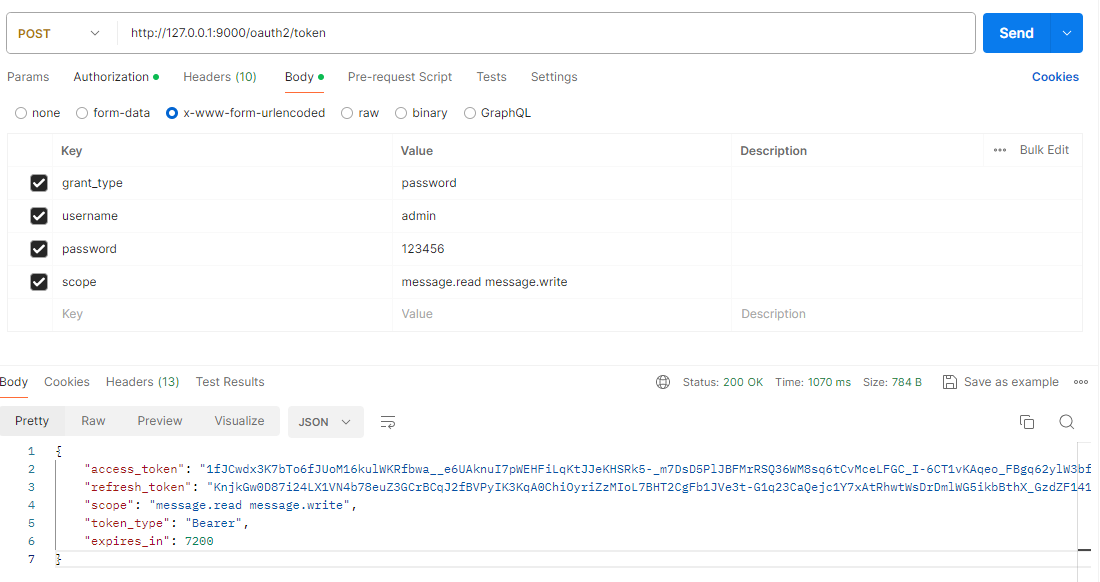
① 使用密码模式获取令牌
GET /
Headers 请求参数
Authorization: Basic bWVzc2FnaW5nLWNsaWVudDpzZWNyZXQ=cURL代码片段
curl --location 'http://127.0.0.1:9000/oauth2/token' \
--header 'Content-Type: application/x-www-form-urlencoded' \
--header 'Authorization: Basic bWVzc2FnaW5nLWNsaWVudDpzZWNyZXQ=' \
--data-urlencode 'grant_type=password' \
--data-urlencode 'username=admin' \
--data-urlencode 'password=123456' \
--data-urlencode 'scope=message.read message.write'
成功获取了访问令牌和刷新令牌,密码模式扩展成功。